
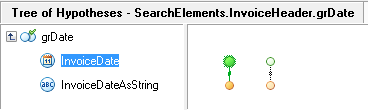
Screenshot of the Hypotheses window showing the left-hand pane listing FlexiLayout elements and the right-hand pane displaying the tree of hypotheses generated by matching the FlexiLayout with a sample image.
The Hypotheses window displays the tree of hypotheses generated when you match your FlexiLayout with a sample image. A hypothesis is generated for each FlexiLayout element. The window has two panes:
  • Left-hand pane – Lists the FlexiLayout elements in the order in which they occur in the tree.
  • Right-hand pane – Displays the tree of hypotheses.

Open the Hypotheses window

1

Match the FlexiLayout with a sample image

Select FlexiLayout → Match.
2

Display the Hypotheses window

In the Image window, click the Matched layout button Matched layout button on the toolbar.