The Get Status tool retrieves the processing status of transactions from ABBYY Vantage. Pass a data table containing one or more rows in the Input anchor. Each row should contain one transaction identifier. The tool returns the statuses of all transactions. To poll for status until a transaction is processed, include Get Status inside a macro. See the Sample process for an example.

Connection settings

The Get Status tool includes the connection settings described in Configure the connection.

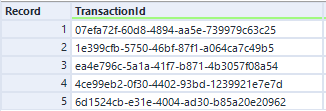
Input anchor

Input example:
Get Status input table showing five rows of TransactionId GUID values

Output anchor

Output example:
Get Status output table showing five transactions with varying Status values including Processed, Failed, Processing, and New