
- DirectoryPath mode – Pass the location of a folder containing input files. For all files located directly in the folder, the tool creates one transaction in ABBYY Vantage. Pass multiple rows to create a separate transaction for each folder.
- Files mode – Pass the location of individual files and their parameters. This mode lets you set separate file parameters for each document in the transaction.
Connection settings
The Use Skill tool includes the connection settings described in Configure the connection, plus an additional Vantage Skill setting for selecting the skill to use for document processing.Input anchor
DirectoryPath mode
Pass a folder path in the DirectoryPath column. All files located directly in the specified folder are added to the transaction as one group. Files in subfolders are not included. Pass multiple rows to create a separate transaction for each folder: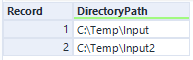
Files mode
Pass file paths and parameters in the Files column using the following format:;) acts as a separator between different files and between files and their parameters. Use FileParamName to set a named file parameter for the document.
For example, to add Invoice_01.tif and Invoice_02.tif to a transaction with Created and Size parameters for each document:

Transaction registration parameters
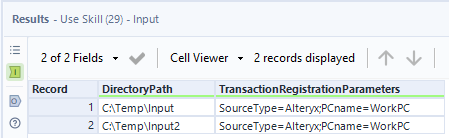
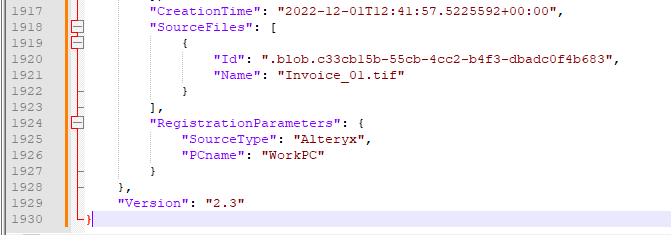
Pass transaction-level parameters in the Transaction Registration Parameters column using the format:;). For example, to pass the source type and computer name:
Output anchor
Output example:

ABBYY Vantage allows uploading transactions of up to 2 GB in size. To speed up document processing, keep individual file sizes to a maximum of 30 MB.