
You do not need this feature if your Document Definition uses vendor and business unit databases, in which case the required addresses are taken from the corresponding database fields.
Limitations
- Address parsing requires the NLP module to be installed.
- Only English and German addresses can be parsed. If the feature is used for addresses in unsupported languages, the corresponding fields may be populated incorrectly.
- Enabling this feature may slow down document processing for certain document types and for very complicated addresses.
Enable address parsing
By default, address parsing is disabled. To enable address parsing:1
Open the Document Definition properties
Click Document Definition → Document Definition Properties….
2
Open the Document Definition settings
In the dialog box that opens, click the Document Definition Settings tab.
3
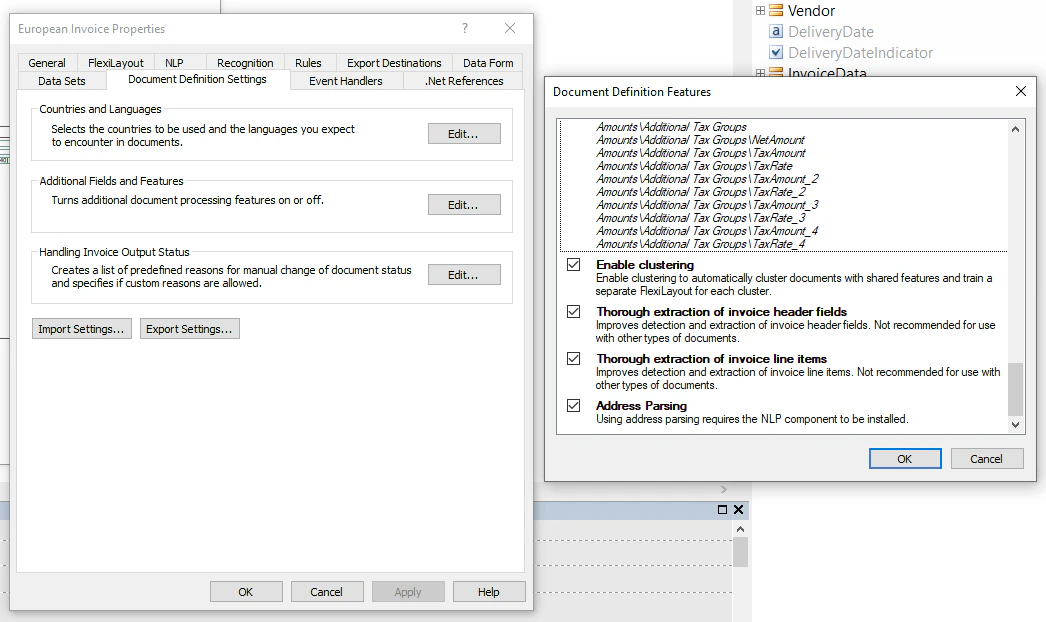
Open the Document Definition features
Under Additional Fields and Features, click Edit….
4
Enable address parsing
In the dialog box that opens, select Address Parsing.
- If the required address is found in the vendor or business unit database and has a high confidence score, the program exports the found address.
- If the program fails to find the required address in the vendor or business unit database, or if the found address has a low confidence score, the program parses and exports the address captured from the image.
Enable address parsing for projects from earlier versions
To enable address parsing for a project created in a version of the program earlier than ABBYY FlexiCapture Release 3 Update 4:1
Update your project
Update your project.
2
Select the Address Parsing version
In the Document Definition Settings dialog box, select the Address Parsing version.
3
Create the BU rule chain
Create a rule chain from the new BU Address Parsing rule from the BU/Address field and from the old Business unit must be found in database rule from the BU group.
4
Create the Vendor rule chain
Create a rule chain from the new Vendor Address Parsing rule from the Vendor/Address field and from the old Vendor must be found in database rule from the Vendor group.
5
Enable the rules
Enable the BU Address Parsing and Vendor Address Parsing rules.