
- Invoice Processing (EU) for the European Union
- Invoice Processing (ES) for Spain
- Invoice Processing (US) for the United States
- Invoice Processing (CA) for Canada
- Invoice Processing (Au-NZ) for Australia and New Zealand
- Invoice Processing (JP) for Japan
Taxes in the EU
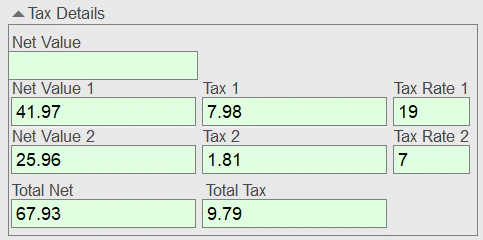
ABBYY FlexiCapture for Invoices uses the following tax principles for invoices from EU countries:- A full tax rate is applicable to most goods and services.
- Tax is included in the price.
- There may be reduced tax rates for some goods and services. These can vary depending on the type of goods or legal entity (for example, sole proprietors may be entitled to reduced tax).
Taxes in Spain
The Spanish tax system differs in some important respects from the tax systems in place in other EU countries. In Spain, a product or service may be subject to multiple taxes, and some tax amounts may be negative when income tax is refunded. Tax rates may vary depending on the region (in the Canaries, for example, a product may be subject both to a base VAT and an indirect tax). In ABBYY FlexiCapture for Invoices, you can create tax groups for the multiple taxes that may be levied on a particular type of product or service. For more information, see Tax groups. Since the Spanish tax system differs significantly from that of other EU countries, the rule checks are also different. The Spanish data form looks as follows: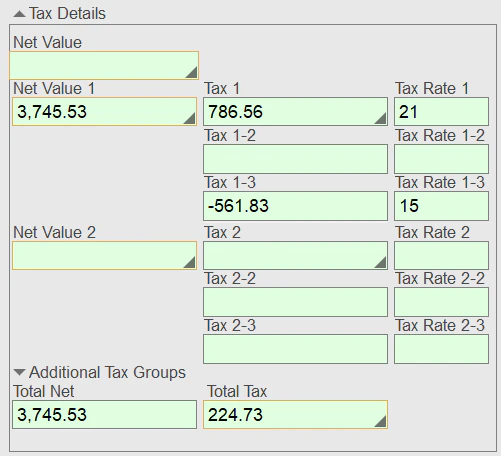
Taxes in the US
In the US, the federal government, state governments, and municipal governments all collect their own taxes. In addition, some state districts levy an additional “local surtax” on goods and services. For this reason, the total VAT is not always known in advance. Unlike in the EU, US documents cannot contain goods and services that are subject to different tax rates. ABBYY FlexiCapture for Invoices includes pre-configured tax groups for US documents, allowing keywords to be combined to search for tax amounts that may apply to the same item. For more information, see Tax groups. Settings for an ABBYY FlexiCapture project contain information about VAT rates for various countries, system-specific rule checks, and keywords that are used to search for the tax amounts. To correctly display all the tax amounts, the data form looks as follows: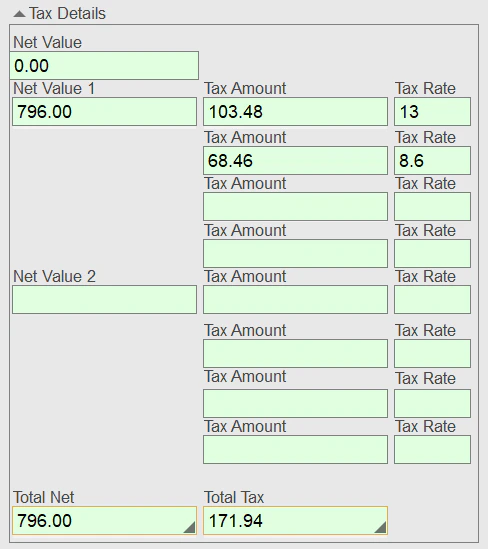
Taxes in Canada
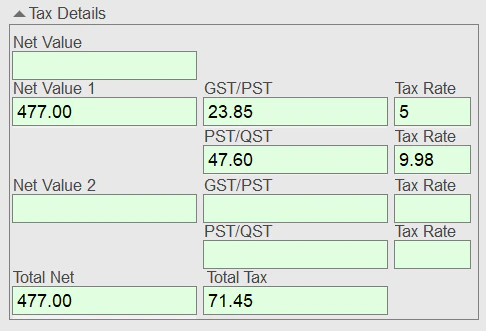
In Canada, taxes differ from province to province. In some provinces, only federal tax is levied on goods and services, while in others both a federal tax and a provincial tax must be paid. Some provinces also impose an additional tax on liquor. Depending on the province, the following taxes may be imposed on goods and services:- GST only (goods and services tax) – 5%
- HST only (harmonized sales tax) – 15% or 13%
- GST + provincial tax:
- PST (provincial sales tax) – 7% or 6%
- QST (Quebec sales tax) – 9.975%
- RST (retail sales tax) – 7% (only in Manitoba)
Taxes in Japan, Australia, and New Zealand
In these countries, only one tax is imposed on goods and services. The rates are as follows:- Japan – 10%
- Australia – 10%
- New Zealand – 15%
0% tax rate
In some cases, the applicable tax rate can be 0% for the entire invoice. For example, no VAT is typically imposed on international sales of goods and services (that is, when the vendor’s and business unit’s countries are different). Additionally, some goods and services may be exempt from tax. For example, shipping may be exempt from VAT. If this is the case, the invoice contains both taxable and non-taxable items. A 0% tax rate for international invoices is already included in the settings for all countries, so you do not need to add it manually.Configure taxes in your project
Before you begin:1
Create a new project
Create a new project.
Select the project type based on the region of the business unit. If the business unit is located in one region while invoices come mostly from another region, select the country where the majority of invoices are issued. You can add more countries later.
2
Name and save the project
Specify a name for your project and a storage location.
3
Set up the project
Set up your project.
1
Open the Document Definition settings
In the Document Definition Properties dialog box, click the Document Definition Settings tab.
2
Open Countries and Languages
In the Countries and Languages section, click Edit….
3
Select the countries
Select the countries from which you expect to receive invoices.
You can add more countries later.
- Invoice Processing (EU) – Austria, France, Germany, United Kingdom, and Switzerland
- Invoice Processing (ES) – Spain
- Invoice Processing (US) – USA
- Invoice Processing (CA) – Canada
- Invoice Processing (Au-NZ) – Australia and New Zealand
- Invoice Processing (JP) – Japan
- Invoice languages
- Tax rates
- Tax groups
- Currency
- Keywords and formats (required for detecting elements such as IBAN and VATID)
Exported goods are typically exempt from VAT. A 0% tax rate for international invoices is already included in the settings for all countries, so you do not need to add it manually.
Change a tax rate
Sometimes, a country may introduce new tax legislation to change its tax rates, with changes taking effect from a certain date, meaning that invoices posted before and invoices posted after that specific date contain items that are taxed at different rates. To enable the program to handle invoices compliant with both old and new tax laws:1
Select the country
Select the country from the list.
2
Open its properties
Click Edit….
3
Open the Tax Rates tab
In the dialog box that opens, click the Tax Rates tab.
4
Edit or add a tax rate
Select the modified tax rate from the list and click Edit…. Alternatively, click Add… to add a new tax rate.
5
Specify the rate
In the Tax Rate Settings dialog box, specify the value, time period, and keywords for the tax rate.
Tax groups
If multiple taxes may be levied on a particular type of goods or services, a tax group should be created. For example, this can be useful for Spanish system invoices, where in a particular region, VAT and a regional tax can both be levied on an item at the same time in a particular combination. Grouping taxes together makes the program look for a specific tax combination. To edit a tax group:1
Open the Document Definition settings
In the Document Definition Properties dialog box, click the Document Definition Settings tab.
2
Open Countries and Languages
In the Countries and Languages section, click Edit….
3
Select the country
Select the country you want to edit and click Edit….
4
Edit or add a tax group
Edit an existing tax group by clicking Edit…, or add a new one by clicking Add….
- Canada
- Spain
- USA
Netherlands
The following tax rates are pre-configured for the Netherlands: 21%, 19%, 6%, and 9%. A time period is also specified for each, because the tax rates have changed over time:- A full tax rate of 19% was charged before September 30, 2012, which became 21% on October 1, 2012.
- A reduced rate of 6% was charged before December 31, 2019, which became 9% on January 1, 2019.