
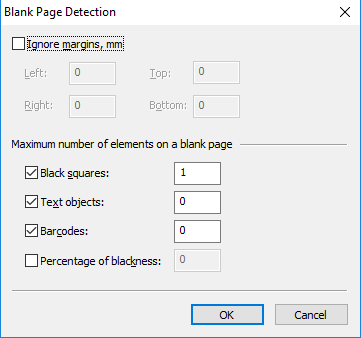
| Option | Description |
|---|---|
| Ignore margins, mm | Select this option to automatically crop the page (in millimeters on top, bottom, left, and right) before the program checks whether the page is empty. After cropping, the resulting page is checked for other parameters. |
| Black squares | Select this option if you want pages with a certain number of black squares (special form design elements) to be deemed empty. Specify the maximum number of black squares allowed on a page. Don’t use this option as the primary check, because scanning can introduce unwanted dots. Text objects is more reliable, and you can use Black squares as an additional check. |
| Text objects | Select this option if you want pages with a certain number of text objects to be deemed empty. Text objects include any separate text fragments. You can use this option, for example, for pages with headers and footers. Specify the maximum number of text blocks allowed on a page. |
| Barcodes | Select this option if you want pages with a certain number of barcodes to be deemed empty. Specify the maximum number of barcodes allowed on a page. |
| Percentage of blackness | Select this option if you want pages with a certain percentage of black color to be deemed empty. Select the maximum percentage of blackness allowed on a page. The black-to-white ratio is established after image binarization. |