
Global settings let the Administrator create batch types centrally and distribute them to every Scanning Station, so Operators process images without setting up batch types or export destinations. Use global settings when Operators work with predefined settings to avoid mistakes. The ABBYY FlexiCapture Scanning Station uses either global or local settings. The Administrator chooses which to apply when exporting batch types to the server:
  • Global settings – The Administrator distributes batch types to all stations by enabling the Distribute these batch types to all Scanning Stations option. Operators then process images with the predefined settings.
  • Local settings – Operators create batch types and specify their own processing and export settings. See Local settings on Scanning Stations.

How global settings work

When the Administrator distributes batch types to all Scanning Stations, global settings apply. The Administrator and Operators then have the following tasks.
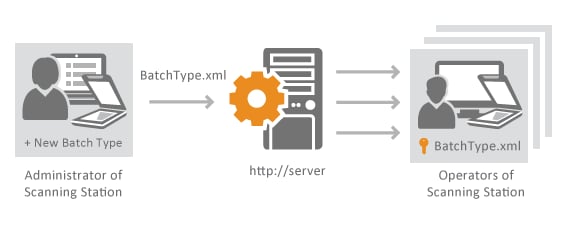
Diagram of the global settings workflow on the ABBYY FlexiCapture Scanning Station, where the Administrator creates a new batch type and distributes BatchType.xml through the server to the Operators of multiple Scanning Stations.
Operators can change the processing settings of batch types that are not protected by a password. However, if the server updates batch types, global settings are restored and Operators lose all their changes. Using global settings can help standardize batches and reduce the time spent setting them up.
If the Update batch types on start automatically option is disabled on a Scanning Station but the Administrator has enabled the Distribute these batch types to all Scanning Stations option, batch types on the Scanning Station are still updated automatically every time it starts.