
How SameSite affects cookie files
SameSite is a security feature that stops third-party domains from creating cookie files until the user has navigated to their website. It prevents third parties from using browser cookies to track users online and the websites they visit. In February 2020, Google changed the SameSite feature in Chrome 80 and later. The SameSite attribute for cookie files takes one of three values.
As a result, from Chrome 80 onward you cannot use the product in an iframe over the unsecured HTTP protocol. Attempting to do so returns the error
Due to browser policy restrictions, this URL cannot be opened using the insecure HTTP protocol. Please use the secure HTTPS protocol or change your browser policy.
The error message also links to https://www.chromium.org/updates/same-site. The error affects Google Chrome and Microsoft Edge. As a workaround, enable the SameSite by default cookies option in your browser settings.
Enable SameSite by default in Google Chrome
1
Open the browser flags page
Navigate to 
chrome://flags/.2
Enable the SameSite mode
Enable the SameSite by default cookies mode.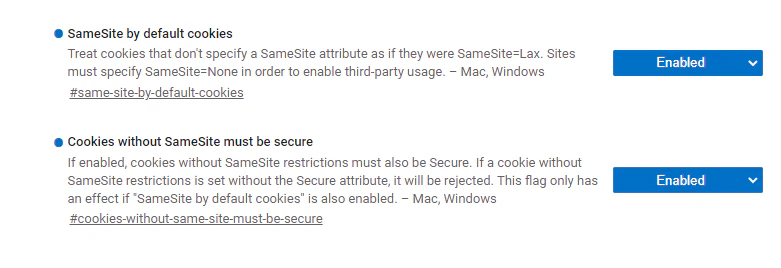
3
Restart the browser
Restart your browser for the changes to take effect.
4
Verify the result
Open your website and check that the development tool console works as intended.
Enable SameSite by default in Microsoft Edge
1
Open the browser flags page
Navigate to 
edge://flags/.2
Enable the SameSite mode
Enable the SameSite by default cookies mode.
3
Restart the browser
Restart your browser for the changes to take effect.
4
Verify the result
Open your website and check that the development tool console works as intended.
Updates for other browsers
Other browsers, such as Firefox, handle cookie files as follows:- Cookie files without the SameSite attribute are treated as
SameSite=Lax. If third-party access is required, add the SameSite attribute to your cookies. - Cookie files that require third-party access need the
SameSite=None; Secureattribute.