
The Access Denied error when creating a database
1
Verify that the tables were created
Use the database management system (DBMS) to check whether the database tables exist.If they do not, the account you specified when creating the database lacks permission to modify the database schema. Ask the database administrator to grant it. For more information, see Create a database.
2
Check the Application Server connection string
Open the Application Server
web.config file, by default in C:\inetpub\wwwroot\FlexiCapture12\Server. It must contain a <connectionStrings> node holding an add node with the name="FlexiCapture12ConnectionString" attribute.A missing <connectionStrings> node means the account that launched the Application Server cannot modify web.config. Grant that account permission to modify the file.Unable to create an Oracle database
An Oracle database needs Oracle Provider for OLE DB installed on the Application Server machine, plus a TNS connection. If FlexiCapture reaches the Oracle server but still cannot create tables, it returns an error in the formORA-XXXXX: error message. For example, ORA-00933: SQL command not properly ended.
If no such error appears and the database still will not be created, work through these checks.
1
Check Oracle Provider for OLE DB
Confirm that the provider is installed, and that its bitness matches the Application Server pool in the IIS settings. The 64-bit version is the default.Restart the computer after installing the provider.
2
Test the TNS connection
Run 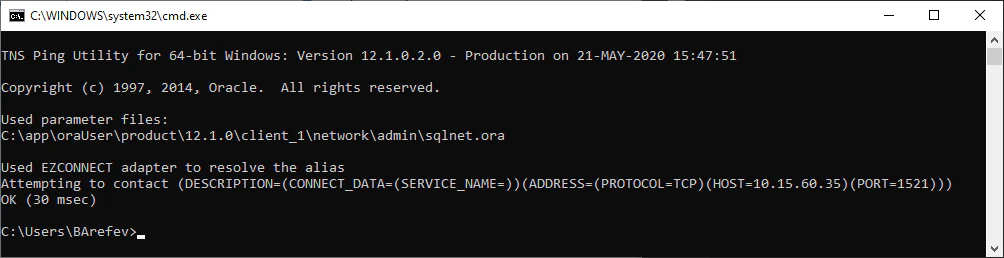
tnsping <TNSName>, where <TNSName> is the connection name. That name must also appear in the Server instance name (Oracle) field in the Administration and Monitoring Console.3
Check the firewall and proxy settings
The Oracle port must be open. Port
1521 is the default.