
UnitPrice、Price、RATE で表せることがわかります。また、Unit という名前は Unit として現れます。FlexiLayout Studio が Unit Price 列名の中の Unit という単語を検出しないようにするため、まず一意のテキストを含む Unit Price を記述し、その後で追加のリレーションを使用して Unit を記述します。
Unit Price 列名のキーワードを検索する要素を作成するときは、Unit Price 列が常に Quantity 列の右側にあることを考慮してください。
kwUnitPrice 要素を作成する
1
Static Text 要素を作成する
TableHeader 要素内に Static Text 要素を作成し、kwUnitPrice と命名します。
2
検索テキストを入力する
Static Text タブをクリックします。Search text フィールドに
UnitPrice|Price|RATE と入力します。3
位置リレーションを追加する
この名前を Designation 名と同じ高さに配置するには、Relations タブをクリックし、Step 7.2 で説明されている追加の制約を指定します。
4
X 座標に制約を設定する
Relations タブで、次の条件を指定します。値が 0 の X 座標に最も近い要素を検索します。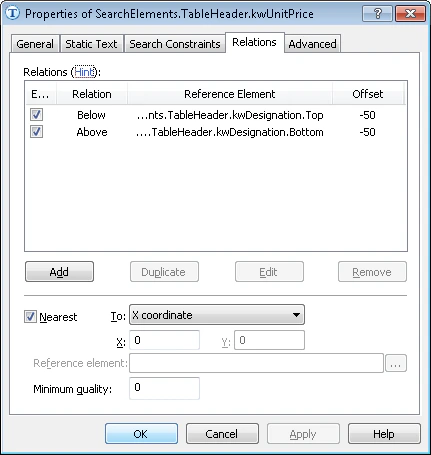
5
pre-search 条件を追加する
Unit Price 列名は kwQuantity 列名の右側にあるため、Advanced タブをクリックし、Advanced pre-search relations で次の条件を指定します。kwQuantity 要素が検出された場合は、その右側の画像オブジェクトを検索します。FlexiLayout language では、次のように指定します。
6
Designation がない場合は検索をスキップする
検索を最適化するため、Step 7.2 で説明されているように、Designation 名が検出されない場合はこの名前を検索しません。
7
post-search relations を追加する
Advanced post-search relations フィールドで追加チェックを設定し、生成された仮説の品質に影響を与えます。要素が検出された場合は、参照幅と検出された要素の幅との差を計算し、その差が指定されたファジー区間に含まれるかどうかを確認します。FlexiLayout language では、次のように指定します。
8
FlexiLayout をマッチングする
FlexiLayout をマッチングし、要素が文書の最初のページで検出されることを確認します。