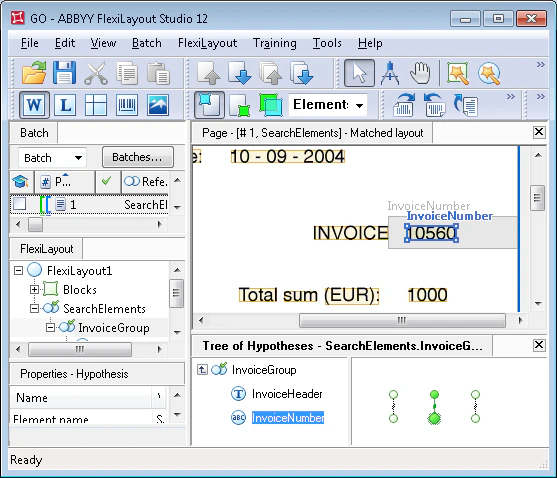
This is done to optimize the FlexiLayout, to speed up the matching procedure, and to avoid the unwanted “branching” of the tree of hypotheses. However, a hypothesis that is optimal for FlexiLayout Studio does not necessarily correspond to the sought object on the image.This might happen if the search constraints for the element are not strict enough. When such a situation arises, first analyze the parameters set for the element search.
The GO.fsp sample project
Consider the project GO.fsp (folder %public%\ABBYY\FlexiCapture\12.0\Samples\FLS\Tips and Tricks\GO\1), where the goal is to find the field “Invoice number”.
The project has two pages:
- Page 1 – The image quality is good.
- Page 2 – The name of the sought field is noisy.
The letter case of the name in the Search text section is irrelevant.
Why hypothesis generation stops at a quality-1 chain
Note that the string “Invoice” specified as the value for the InvoiceHeader element occurs on the images three times: as the name of the “Invoice number” field, as a substring in the name “Invoice date”, and at the bottom of the invoice, as a substring in the payment conditions “Current invoice is…”. You can therefore predict that there will be three hypotheses after the matching procedure. After running the FlexiLayout matching procedure by selecting the Match command, you can see that the tree of hypotheses in the Group element InvoiceGroup has only one complete chain instead of the expected three, and that single chain does not correspond to the name being detected.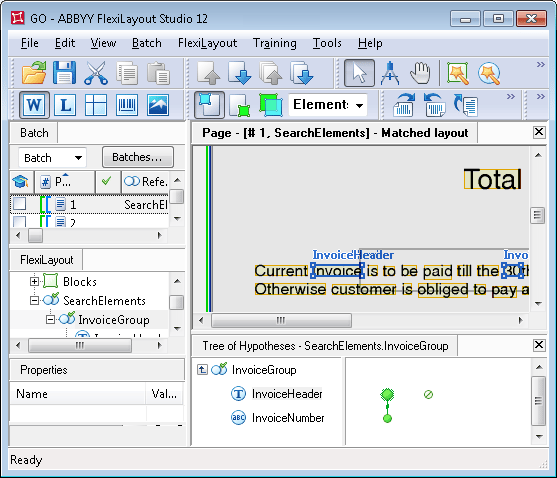
To see the tree of hypotheses of the group, double-click the name of the Group element in the tree of hypotheses, or press Enter, or select Show Details from the shortcut menu.
Anchor the name to the right page edge with Nearest
If the arrangement of the fields is assumed to be identical on all the pages of the project, the easiest way is to “tell” FlexiLayout Studio that the required string “Invoice” is the element nearest to the right edge of the page. To do this, write the following code in the Advanced pre-search relations section of the InvoiceHeader element:Nearest: PageRight;.
This works because the name of the sought field “Invoice number” is the only element nearest to the right edge of the page. If this were not the case, or if the document were not formalized, the Nearest function could not solve the problem.
Penalize distant number hypotheses with FuzzyQuality
Alternative ways to perform this task, including the case of a semi-structured document, are shown in theGO.fsp project (folder GO\2).
As you can see on the images, the distance between the digit string and the word “invoice” is the smallest in the sought field “Invoice number”.
This is true on all the pages, which makes it possible to affect the quality values of generated hypotheses by entering the following code in the Advanced post-search relations section of the InvoiceNumber element:
{0, 0, 0, 10000}*dt.
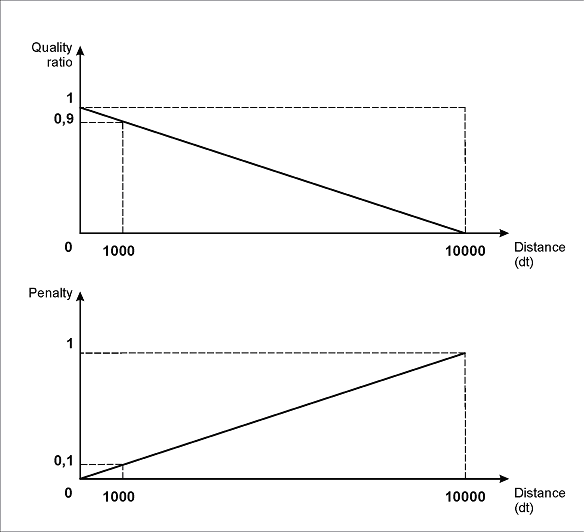
This description of the interval shows the linear dependency between the quality of the hypothesis and the distance between the elements: the longer the distance, the greater the penalty (the FuzzyQuality function returns the post-search quality of the hypothesis, which can be seen in the Properties window of the hypothesis).
The value for the right boundary of the interval (10000dt) was determined experimentally. When choosing this value, you should take into account the distance between the corresponding objects on test images.
As the following figure shows, under the specified interval properties, the maximum penalty (1) will correspond to a distance of 10000dt. Accordingly, a distance of 1000dt will bring a penalty of 0.1, a distance of 100dt a penalty of 0.01, and so on.
So for real distances of about 100-300 dots, which can be seen on the images, the penalty coefficient will be 0.99-0.97.
For more information about the use of these functions, see Search for elements with Nearest and FuzzyQuality.