
For the sake of simplicity, a one-page document is used in this sample.
FuzzyQuality function, as well as the functions of the Nearest group (Nearest, NearestX, NearestY).
How the Nearest and FuzzyQuality functions differ
The applications of these functions are different. TheNearest function can only be used in the Advanced pre-search relations field. It specifies that, among the several hypotheses of the element, FlexiLayout Studio must select the hypothesis nearest to a certain element or point on the image, which is set in the properties of the Nearest function.
In the Advanced pre-search relations field of the element, only one function of the Nearest group can be used. After it is run, only one hypothesis is left. This happens at the stage of hypothesis generation, that is, before the code specified in the Advanced post-search relations field is run.
The Minimum quality parameter, which specifies the minimum quality of hypotheses for the element, can be specified for the Static Text, Character String, Paragraph, Date, and Separator elements.
There is no guarantee that the remaining hypothesis is the best (and corresponds to the required object of the image), because Advanced post-search relations are very important for assigning a quality value to a hypothesis. When using the Nearest function, the choice of hypothesis is made at the stage of hypotheses generation and is based on the proximity to some point, not on the quality of the hypothesis.
Keep in mind that if the properties specified in the Advanced post-search relations section are important for the correct selection of the hypothesis, you should use the FuzzyQuality function instead of the functions of the Nearest group.
The FuzzyQuality function can only be used in the Advanced post-search relations section. Unlike the functions of the Nearest group, it does not select a single hypothesis but instead influences the overall quality of all the generated hypotheses based on the properties of these hypotheses and the parameters of the FuzzyQuality function.
In addition, the FuzzyQuality function can be used multiple times for a single element in the Advanced post-search relations field. This means that several different constraints with different quality values can be applied to a hypothesis. All the values will be multiplied to determine the Post-search quality of the hypothesis.
The FuzzyQuality function looks as follows:
The FuzzyAndNearest sample project
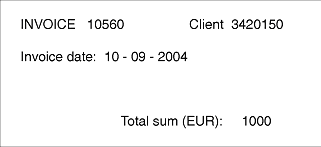
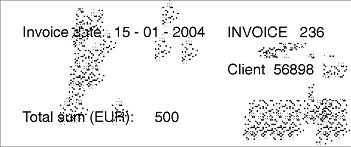
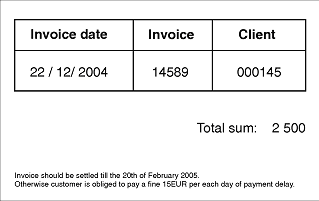
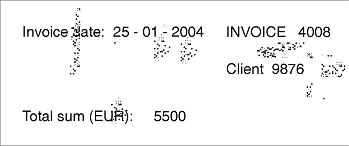
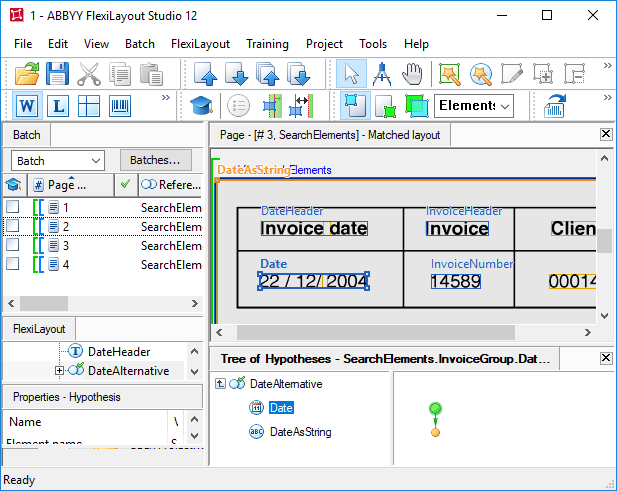
This sample shows how theNearest and FuzzyQuality functions can be used on the following images.
 |  |
|---|---|
 |  |
1.fsp project (folder %public%\ABBYY\FlexiCapture\12.0\Samples\FLS\Tips and Tricks\FuzzyAndNearest \Project1).
To optimize the FlexiLayout structure and to follow the logic behind the arrangement of the sought fields in the document, the project groups all the sought elements into a compound element, InvoiceGroup.
FlexiLayout creation could start with an element describing the search constraints for the name of the field “Invoice number”. However, an analysis of the images shows that the word “Invoice”, which makes up the name, is encountered on the document several times.
Since the relative location of the fields changes each time, it is impossible to specify constraints that would guarantee the correct detection of the word “Invoice”. It may, for example, be found in the name “Invoice date”.
To avoid such confusion, the description starts with the name of the date field, using a Static Text element named DateHeader. The Search text field specifies two values of the name: Invoicedate:|Invoicedate (listing the variants of the name as they occur on the images). The letter case of the name is irrelevant.
For more information on why you must specify both variants, see Set multiple Static Text values for field name variants.
Search for the date field with an array of rectangles
The search for the date field relies on the field name. The project contains a group DateAlternative, which consists of two elements: a Date element to search for the date field in one of the specified formats, and a Character String element, in case the format of the sought field is different.For a detailed description of creating a FlexiLayout for date search, see Date search after high or low-quality recognition.
The first line of the code (
let Header = InvoiceGroup.DateHeader;) simplifies the code by defining the variable Header and assigning it the value of the element DateHeader.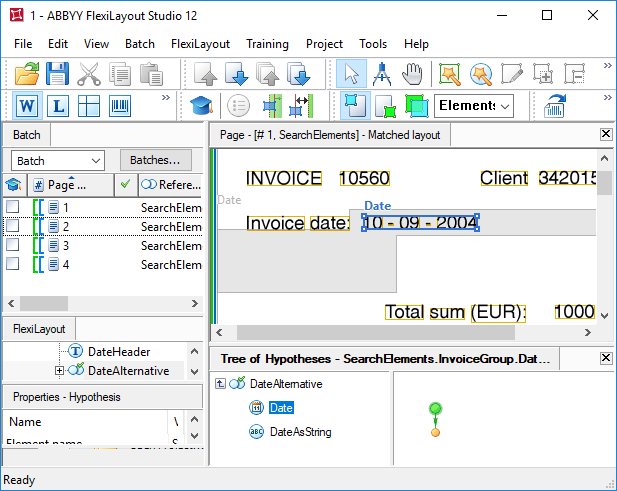
To specify the search area of the DateAsString element as an array of rectangles, instead of calling
RestrictSearchArea (Date.Rect), duplicate the corresponding code from the Advanced pre-search relations section of the Date element.Detect the Invoice field name with Exclude and NearestY
The project also contains a Static Text element (named InvoiceHeader) to detect the name of the field “Invoice number”, with the sought value “Invoice”. Since the document is not structured, no specific search constraints can be given. After the FlexiLayout matching procedure is finished, you can see that the name has been accurately detected only on the first page. On pages 2 and 4, the word “Invoice” was mistakenly detected in the name of the date field. On page 3, it was found at the bottom of the page, and, according to the optimization algorithm, the other hypotheses of the name were not generated, even though the word “Invoice” occurs on the image three times.For more information on optimal search for elements in the group, see Optimize Group element search.
If the FlexiLayout had been started not with the name DateHeader but with the name InvoiceHeader, the
Exclude function could not have been used, as this function can only exclude elements that are located higher than the current element in the project tree.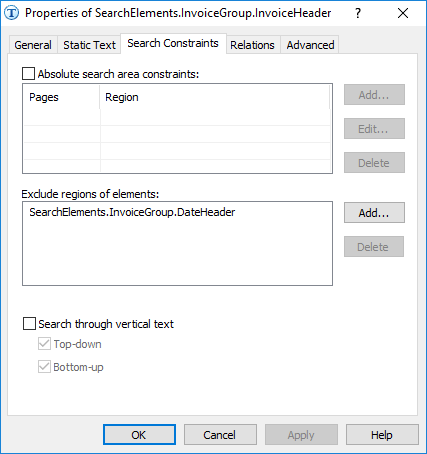
Nearest function is true for both of the “Invoice” strings, because they are located on the same level. Since the recognition quality of the “Invoice” strings is good in both cases, the optimization algorithm generated a single hypothesis instead of two separate ones. Unfortunately, this hypothesis is not correct.
Search for the invoice number with Nearest
To detect the “Invoice number” field, the project uses a Character String element named InvoiceNumber. As with the element for the date field, the search constraints for the “Invoice number” field are specified in the Advanced pre-search relations section. The search area for this element is an array of rectangles.As an alternative (for the images of the current project) to
Nearest: Header;, you could write NearestY: Header.Rect.YCenter; to tell FlexiLayout Studio that the sought field is vertically nearest to the center of the name.This could solve the problem of the incorrect detection of the field “Invoice number” on page 4. However, it does not help on page 5, because the sought field is detected within the date field after the incorrect detection of the name “Invoice number”.Replace Nearest with FuzzyQuality penalties
Now consider how theFuzzyQuality function can be used in such a situation.
This is demonstrated in the 2.fsp project (FuzzyAndNearest\Project2 folder).
The settings of this project are nearly identical to those of the project described earlier.
However, there is one significant difference: the Nearest function is not used in the Advanced pre-search relations section. Instead, the Advanced post-search relations section contains the following code:
FuzzyQuality: Rect.Top - PageRect.Top, {0,0,0,50000} * dt; means that if a non-null hypothesis is generated (the if not IsNull check is run first), the distance between the location of the element and the top edge of the page is determined. That is, the difference (Rect.Top - PageRect.Top) is calculated, and FlexiLayout Studio checks whether this difference belongs to the interval {0, 0, 0, 50000}*dt.
Such a description of the interval means that the quality penalty depends directly on the distance between the element and the top edge of the page: the longer the distance, the greater the penalty.
As shown in picture (a), with the specified parameter values, the maximum penalty (1) corresponds to a distance of 50000dt, while a distance of 1000 dots (1 dot is 1/300 of an inch) means a penalty of 0.02, and a distance of 100dt means a penalty of 0.002.
When choosing the parameters that set the boundaries of the interval (particularly when there are multiple element checks with the
FuzzyQuality function), make sure they do not penalize the right hypothesis so much that its final quality becomes lower than that of a null hypothesis.If the quality of all the hypotheses (including the correct one) is lower than the quality value of a null hypothesis, the null hypothesis may be selected, that is, the element will not be detected.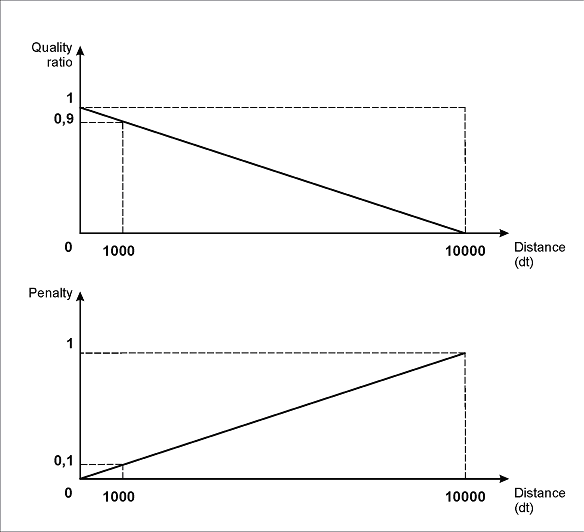
(a)
FuzzyQuality: 500dt - Width, {0,0,0,100000}*dt; means that FlexiLayout Studio considers the difference between 500dt and the width of the detected object corresponding to the hypothesis. That is, the difference (500dt - Width) is calculated, and FlexiLayout Studio checks whether this difference belongs to the interval {0, 0, 0, 100000}*dt.
The narrower the object, the greater the penalty, so longer invoice numbers will be preferable. This constraint can be used if the image is noisy. If the noise is recognized as a character from the specified alphabet (as can be seen, for instance, on page 2), its hypothesis should be penalized to exclude it from further analysis.
The value of 500dt is chosen by visual examination, assuming that the string length in the field “Invoice number” is not greater than this value. The parameters specified here define that the maximum penalty (0.005) would correspond to the zero width of the field “Invoice number”. For any other widths between 0 and 500dt, quality penalties would be lower.
FuzzyQuality: Rect.XCenter - InvoiceHeader.Rect.XCenter, {-10000,0,0,50000} *dt; means that if a non-null hypothesis of the element of the name of the “Invoice number” field is generated (the if not InvoiceHeader.IsNull check is run first), the distance between the center of the detected InvoiceNumber element and the center of the InvoiceHeader name is determined. The difference (Rect.XCenter - InvoiceHeader.Rect.XCenter) is calculated, and FlexiLayout Studio checks whether this difference belongs to the interval {-10000, 0, 0, 50000}*dt.
This description also takes into account the possibility that the field “Invoice number” can be located below the name. In this case, the farther the elements are from each other, the greater the penalty for the corresponding hypothesis.
Hypotheses assuming that the number is located to the right of the name will not be penalized as much as those assuming that the number is below the name, because the “right” arrangement of the field “Invoice number” and its name is much more common.
As shown in picture (b), with the specified parameters of the left and right boundaries of the interval, the maximum penalty (1) will correspond to a shift of the field “Invoice number” from the name field by 10000dt to the left or by 50000dt to the right.
A shift of 1000 dots will be penalized by 0.1 if it is a “left” shift, or by 0.02 if it is a “right” shift. Similarly, a shift of 100 dots will be penalized by 0.01 if it is a “left” shift, or by 0.002 if it is a “right” shift.
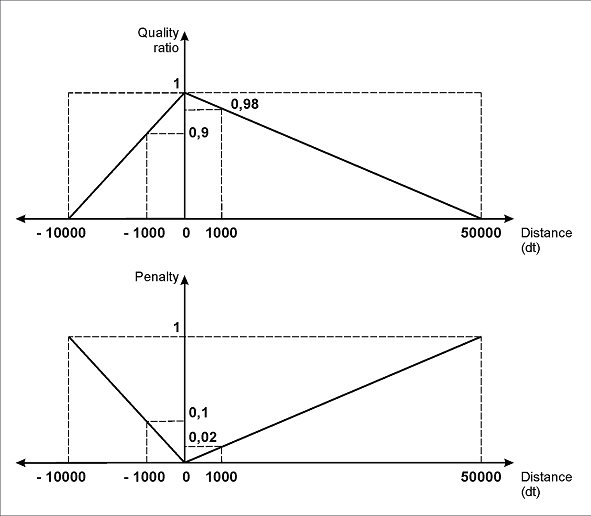
(b)
FuzzyQuality: Rect.YCenter - InvoiceHeader.Rect.YCenter, {-10000,0,0,10000} *dt; is identical to the previous one. However, it is reserved for the cases when the field “Invoice number” is on the same horizontal level as, or even slightly higher than, the field of the name. Penalties here are the same for any vertical shift.
The boundaries of the interval are set in accordance with the same logic: to prioritize hypotheses that find the data field to the right of its name. However, the project shows that these settings did not prevent the correct detection of the invoice number even when it was located below the name (page 3).
After matching the FlexiLayout with all the pages, you can see that the two sought fields have been successfully detected.
In conclusion, the FuzzyQuality function is more efficient and flexible than the functions of the Nearest group, which is particularly important when processing semi-structured documents.