
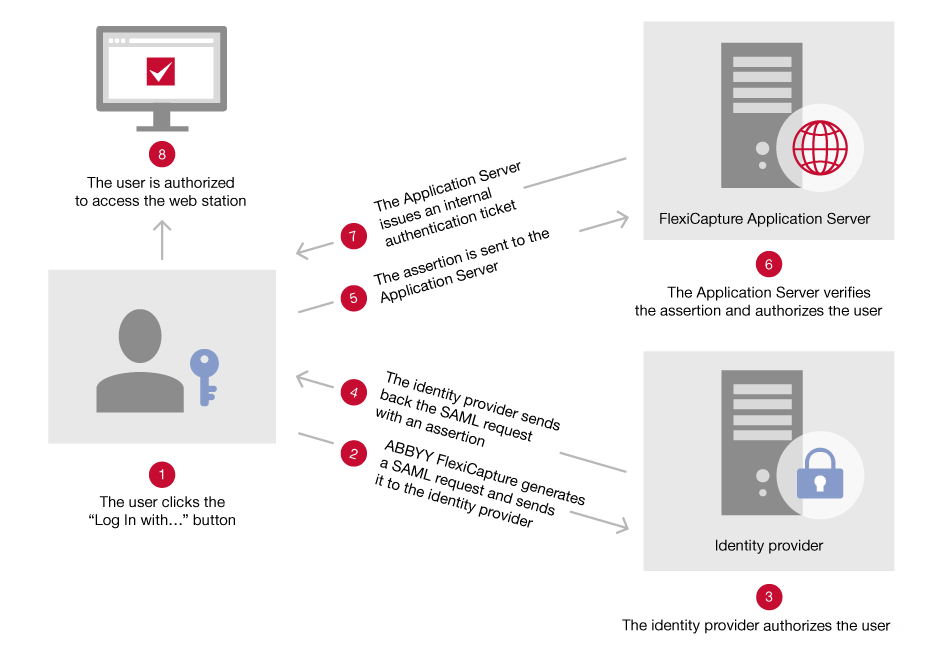
Single Sign-On authentication flow
1
The user starts the sign-in
The user clicks the Log in with [external server name] button.
2
ABBYY FlexiCapture sends an AuthnRequest
ABBYY FlexiCapture generates an
AuthnRequest message, puts it into the SAMLRequest parameter of a URL GET request, and sends the request to the identity provider. Encrypted SAML SSO connections are not supported.The AuthnRequest looks similar to this:3
The identity provider authorizes the user
Authorization happens entirely on the identity provider’s side.
4
The identity provider returns an assertion
On success, the identity provider generates an assertion message. It puts the message into the
SAMLResponse parameter and sends the request back to ABBYY FlexiCapture.5
The request reaches the Application Server
The request carrying the assertion message goes to the ABBYY FlexiCapture Application Server. The server then determines whether the user may log in to the specified station.
6
The Application Server verifies the assertion
Verification uses a public certificate obtained from the identity provider. The Application Server then authorizes the user.
7
The Application Server issues a ticket
It performs the required operations and issues an internal authentication ticket.
8
The user reaches the web station
The issued authentication ticket grants access to the appropriate web station.