
A
ABBYY FlexiCapture
A software solution for single-flow data input from structured documents (fixed forms), semi-structured documents (flexible forms and documents), and unstructured documents (free-format documents).ABBYY FlexiCapture for Invoices
A software solution for processing invoices. For more information, see ABBYY FlexiCapture for Invoices.ABBYY FlexiLayout Studio
A program for creating a FlexiLayout that describes the structure of a document. The FlexiLayout can then be used for automatic document recognition.ABBYY FormDesigner
A program for designing the layouts of machine-readable forms. After these forms are replicated and filled out, the ABBYY FlexiCapture automated form input system can process them. Form layout design is an important stage. The quality of the layout, that is, its machine readability, determines the effectiveness of all later processing stages. These stages are scanning, recognition, verification, and export.ADF
Automatic Document Feeder. A device that feeds documents automatically, so you can scan any number of documents without additional manual operations.Administrator
A user of ABBYY FlexiCapture who is authorized to configure the program for document input, such as creating and editing Document Definitions and import profiles.Alphabet
A set of characters used in the language being described.Anchor
A special form design element that the system uses for matching after scanning. Matching eliminates skew, compensates for linear and nonlinear scanning defects, and calculates the location of blocks. The most reliable anchors are black squares, which are normally located in the corners of a form. If an image has no special anchors, other static elements can be used to match the Document Definition:- Separators, which are vertical or horizontal lines, such as table lines and frames
- Clear static text, such as the form header, field captions, and explanatory information
Anchor barcode
A static element representing a barcode that is not intended for data extraction. An anchor barcode can be used for Document Definition matching or identification.Anchor text
A static element representing text that is present on a blank form and is not intended for data extraction. This can be any explanatory text or header. Anchor text can be used for Document Definition matching or identification.Angle
An anchor shaped as an angle.Annex
Pages that do not contain fields but are included in document assembly. No data is extracted from these pages, but they can be saved as images or searchable PDF files. For more information, see Create Document Definitions for documents with annexes.Assembly error
An error that occurs when a document created during document assembly contains pages from other documents or has its pages in the wrong order. This error also occurs when the values of key fields on the document’s pages do not match.Auto-learning
The ability of ABBYY FlexiCapture to automatically learn to detect new fields and identify document types.B
Barcode
A machine-readable form element made of alternating white and black bars of certain lengths, which encode digital information. A barcode in a document can be used to extract information (barcode field) or to match and identify a Document Definition (anchor barcode).Barcode field
A Document Definition field containing a barcode intended for recognition.Barcode recognition
Conversion of a graphic barcode image to numbers or text.Batch type
A batch property that defines how documents in batches of this type are processed. For more information, see Batch types.Black-and-white line form
A form in which borders of information fields are formed by ordinary lines that do not disappear during scanning.Black square
An anchor shaped as a black square.Brightness
A threshold of light sensitivity that determines at which point the scanner detects grayscale halftones as white.C
Checkmark
A machine-readable form element that the person filling out a form marks, for example, with a tick, cross, or dot, or by inking it out.Checkmark field
A Document Definition field containing a checkmark.Checkmark group
An element of a machine-readable form that unites several checkmarks located near each other. One or several checkmarks can be selected in a checkmark group.Checkmark group field
A Document Definition field containing a checkmark group.Classifier
A project created in FlexiLayout Studio for identifying pages before Document Definitions are applied. A classifier is also used to select the matching FlexiLayout or layout alternative.Classifier F-measure
A combined measure of precision and recall for document classification. It is expressed as a number between 0 and 1, or as a percentage between 0% and 100%. The F-measure is calculated with the same formula for a category and for a test or training batch:
The maximum value is 1 (100%), reached when P = R = 1 (100%).
Code page
A table of values that describes the character set for a particular language.Color background form
A form in which all information fields are white rectangles against a color background that disappears during scanning.Contrast
The ratio between the brightness of the darkest and lightest areas of an image.Control
A text, field, or button element on the data form. For more information, see the Insert Control command in Document Definition editor menu.Corrected checkmark
A checkmark that was selected by mistake and then inked out. If the Allow corrections option is enabled for the checkmark field, the program recognizes the inked-out checkmark as unselected.Cross
An anchor shaped as a cross.Custom data type
A user-defined data type. For more information, see Create custom data types.D
Database lookup
Matching recognized data against corresponding database records.Data set
Data used for automated document checks. A data set can be stored as a table in ABBYY FlexiCapture and synchronized on a schedule. It can also be retrieved from an external source.Data type
A field characteristic that specifies the kind of data in the field, such as number, date, text, last name, given name, or address. A data type defines the set of words that can occur in the field. The data type is an important recognition parameter that affects recognition quality. A correctly specified data type can significantly reduce the number of incorrectly recognized characters.Description file
An auxiliary file that defines how a batch is formed when images are added from a Hot Folder. For more information, see Description file.Dictionary
A set of words that the program uses for a field during recognition and verification. You specify a dictionary when you create a data type, so the data type attached to a field determines its dictionary. Besides the predefined data types with ready-made dictionaries, you can attach data types based on custom dictionaries. You can type dictionary data manually or load it from a file.Document
A combination of one or several page images and data extracted from them.Document batch
A group of documents combined by the user. A batch normally contains a stack of documents scanned in a single pass or imported from a particular folder. For more information, see Batches.Document class
A set of documents or pages that share several common characteristics.Document data
Data captured from document page images after processing, which includes recognition, verification, and editing of recognition results.Document Definition
A definition that specifies how a particular type of document is identified and processed. A Document Definition contains the following:- The document structure, which describes the allowable order of pages for documents of this type and defines how documents are assembled
- Definitions of document sections
- A list of rules that field data should satisfy
- The locations of fields and their captions in the data window (data form view)
- Document export settings
- Document processing settings
Document Definition identification
The process of selecting the required Document Definition by using identifiers.Document Definition matching
The process of selecting a Document Definition and matching its fields against an image.Document Definition publication
Allowing access to a new Document Definition version after it has been edited. A published version is used to process documents from working batches. An unpublished, local version can be used only to process documents from test batches. For more information, see Edit and publish a Document Definition.Document Definition section
A component of a Document Definition that corresponds to one or several pages containing a logically complete set of fields. Fields within one section can continue from one page to the next, such as multipage tables. Field sets from different sections do not intersect. A section definition can be flexible or fixed.Document identification
The process of assigning documents to one of several predetermined document types.Document set
A set of logically related documents that are used for a specific purpose. For example, a business process can start with a set of documents from an applicant, such as a filled-out application form and some accompanying documents. Depending on the information on the application form, some accompanying documents can be optional, while others must be enclosed with the application.Document text
All the text captured from a document during preliminary recognition, before the FlexiLayout is applied. You can save this text so that it can be used during verification. Saving it requires additional hard disk space.Document type
A group of documents that have several characteristics in common and play a specific role in business processes. Examples of document types are invoices, contracts, and passports.Document variant
A group of documents of the same type that share several characteristics. Examples of document variants include invoices from different vendors and credit statements from the same bank.Dot-matrix printer
A type of recognizable text printed with a dot-matrix printer.dpi
Dots per inch. A unit of measurement for image resolution.E
Entity
A field or a group of fields containing information to extract by using NLP technology. Examples of entities include people, companies, places, amounts, and dates.Environment variable
A string that is used to store text, such as system settings. Environment variables can store database connection strings and the variables used to specify the names of exported files.Error or warning
An error or warning occurs when data extracted from one or more fields does not satisfy the rules applied during automatic checks. It also occurs when the data does not match the specified format. There are two types of errors and warnings:- Single-field errors and warnings are generated by rules and formats that affect one field.
- Multi-field errors and warnings are generated by rules that affect multiple fields.
Explanatory text
A machine-readable form element that represents descriptive text, such as the form name, field names, and explanations for fields.Export
The process of transferring processed data to an external information system or file.Export profile
A set of settings that determines what is done with processed data, such as the format of output files, the output path, and export conditions.External database
A text file or an ODBC-compatible database that stores reference data. Reference data can include the possible values of captured fields or information required for capturing fields.F
Field
A document element intended for data extraction. Fields can be simple, without an internal structure, or composite. For example, in a table field, each cell can be viewed as a separate subordinate field of the table. For more information, see Document Definition fields.Field region
An image region highlighted in the Document Definition and intended for data extraction.Field verification
A verification mode in which uncertain characters are checked within the context of the entire field. Fields with the Send to field verification option enabled are submitted for field verification. Use field verification for fields whose range of values is known or can be determined easily, such as country or city names. For more information, see Field verification.Field with several instances
A field used to describe several objects of the same type (recurring objects). These objects are one and the same field and share the same properties. Fields with several instances remove the need to create several identical fields. Fields with several instances are exported to separate files or database tables. For more information, see Fields with several instances.Field with several regions
A field consisting of several regions on the image. These regions can be located at a distance from one another and even on different pages. Values from all regions of the same field are combined and exported together as one field. This type of field is normally used for objects located on several pages, such as large tables. For more information, see Fields with several regions.Field without a region
A field that is specified in a Document Definition but has no region on the image. For more information, see Fields without a region.Fixed Document Definition
A definition of a document or its section designed for processing fixed forms. Fields in a fixed Document Definition have fixed locations.Fixed form
A document with fixed information fields whose formatting, number, and layout are strictly defined and do not change from one document instance to another.FlexiLayout
A description of the structure of a semi-structured document. You design this description in ABBYY FlexiLayout Studio and export it to ABBYY FlexiCapture. The file format is*.afl.
A FlexiLayout is a kind of instruction for detecting and identifying fields in a flexible form.
FlexiLayout variant
A FlexiLayout for a document variant that was either developed specifically for this document variant or trained on it. A FlexiLayout variant is used together with a generic FlexiLayout.Flexible Document Definition
A definition of a document or its section designed for processing semi-structured documents. It is created by attaching a FlexiLayout. Fields in a flexible Document Definition do not have fixed locations, because the FlexiLayout detects them. For more information, see Create a Document Definition based on a flexible description.Form
A document comprising one or several pages designed to be filled out by a person by hand or using any other printing technique.Framed text
A type of text marking where a frame delimits the text.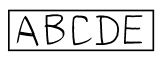
Framed text over a comb
A type of text marking where text is entered in a frame with a comb.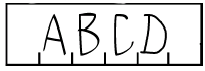
G
Gray background form
A form in which all information fields are white rectangles against a gray background that disappears during scanning.Group verification
A verification mode that groups character images recognized as identical values and displays them together for a visual check. Fields with the Send to group verification option enabled are submitted for group verification. Use group verification for characters from number fields and for checkmarks. For more information, see Group verification.H
Hand-printed text
A type of recognizable text printed by hand in separate characters.Handwritten text
A type of recognizable text with letters that are fully or partially joined. Only English handwritten text can be recognized.Hot Folder
A folder on the hard drive of a local or remote computer that is used to import images. It is normally used for periodically recurring image uploads that need no user involvement. For more information, see Image import profiles.I
ICR (Intelligent Character Recognition)
Technologies and systems for recognizing handprinted characters. They are designed for mass processing of documents filled out with handprinted letters and numbers.Identifier
A static element used to reliably select a Document Definition from several Document Definitions with identical locations of anchors. Enable the Use for Document Definition identification option in the properties of these static elements.Identity provider
A third-party system, such as Azure AD, OneLogin, or Okta, that manages identity information and provides authentication services to its clients. An identity provider lets users access all authorized resources in their local area network by entering their credentials only once.Ignored character
A character that is excluded from words when the words are attributed to a data type. Ignored characters can occur inside words without affecting their verification, such as hyphens and stress marks.Image
An electronic image of a scanned page from a hardcopy document.Image despeckling
Removal of noise from the image. Noise can appear during scanning, and removing it improves data recognition. During despeckling, the program also removes background dots or the boundary lines of raster forms.Image import
The process of adding images to a batch for processing. You can import images from files, from a scanner, or by using import profiles. For more information, see Add page images.Image rotation
Rotation of an image around its center.Import profile
A combination of settings used to add images to a batch, such as the import source, image processing options, and Hot Folder cleanup options. For more information, see Image import profiles.Index field
A field whose value is used to index documents for sorting and search. For more information, see Index fields.Inverted image
An image with light-colored text against a dark background.Invoice
A document that lists the goods supplied, with their quantity, price, and characteristics, such as color and weight. An invoice also lists the shipment conditions and the details of the parties. You can process invoices with a separate solution, ABBYY FlexiCapture for Invoices. For more information, see ABBYY FlexiCapture for Invoices.K
Key field
A field that enables automatic checking of page assembly into documents. The values of key fields must be identical on all pages of the same document.L
Language (local)
A field property that determines the writing language and relevant sets of regional parameters, such as the date or address writing style.Layout
The location of fields on a document image. Layouts can be generated automatically or created manually. For a related term, see Reference layout.Letters in frames
A type of text marking where letters are entered into conjoined frames.
Letters in isolated frames
A type of text marking where letters are entered into isolated frames.
Letters over a comb
A type of text marking where letters are entered over a comb.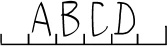
M
Machine-printed text
A type of recognizable text that has been printed using typographic equipment or a laser or ink-jet printer with a minimum resolution of 300 dpi.Machine-readable form
A form designed especially for automated input. It contains work elements, such as anchors, barcodes, and lines, that are required to process it successfully.Manual entry field
A Document Definition field containing unrecognizable text (for example, text consisting of fused letters) that has to be entered from the keyboard.Monospaced text
A type of text marking where each letter is located within a frame of the same height and width. The frame border disappears during scanning.MRC (Mixed Raster Content)
A compression method used for images that contain both text and raster fragments. The image is divided into fragments, and an optimal compression algorithm is selected for each fragment. This approach provides better compression ratios while maintaining the visual quality of images.Multipage document
A document made up of several pages.Multitenancy
A feature that allows several independent users to use ABBYY FlexiCapture. The data of each tenant is completely isolated from other tenants, and the system allocates a portion of its resources to each tenant.N
NER (Named-Entity Recognition)
An information extraction task that searches for attributes in unstructured text and classifies them into predefined categories.NLP (Natural Language Processing)
A subfield of artificial intelligence and mathematical linguistics concerned with the computer analysis and synthesis of natural languages. One possible application is the extraction of meaningful information from text. NLP also includes machine translation, chatbots, classification, sentiment analysis, and data extraction.NLP model
A mechanism that determines which entities and segments to extract from texts, and how. The subject area and the extraction algorithm are selected when an NLP model is trained.O
OCR (Optical Character Recognition)
Optical recognition of machine-printed texts.OMR (Optical Mark Recognition)
A technology that enables ABBYY FlexiCapture to recognize ordinary marks on forms, such as ticks and crosses, with a high degree of certainty. It also correctly identifies marks that were made by mistake and then inked out.Operator
A user of ABBYY FlexiCapture who is tasked with document entry, which includes adding images, performing recognition and verification, and exporting recognized data.Operator role
A property of a user account in ABBYY FlexiCapture. It determines which data the user can access and which actions the user can perform on that data. For more information, see Operate a configured project.Overlay
The process of combining a scan of a filled-out form with an image of the same blank form in the Document Definition editor.P
Page
An image of a paper document page and the results of its processing.Page layout
A scheme showing the location of fields on an image.Page orientation
Page position relative to the standard alignment, which is top to bottom and left to right. Page orientation can be detected automatically during page image recognition. To make this possible, ABBYY FlexiCapture lets you specify the possible orientations.Picture
An element of a machine-readable form that is not subject to recognition but is intended for export as a graphic object, for example, a file.Picture field
A Document Definition field containing a picture.Precision
A characteristic for evaluating automatic classification quality. It is the number of correctly identified class A documents divided by the total number of documents identified as class A, both correctly and incorrectly.Prerecognition
Full-text recognition of document images to facilitate field detection by means of a Document Definition.Processing power
The average number of pages, documents, or batches processed during a specific period of time.Processing stage
A workflow stage in a distributed installation where certain actions are performed on a document or batch, either automatically or by an Operator. For more information, see Processing stages and queues.Prohibited character
A character that you know will not occur in a field. Specifying prohibited characters can considerably increase the speed and quality of recognition. For example, when recognizing texts with only uppercase letters, specify all lowercase letters as prohibited characters.Project
A single environment that unites document batches and the settings required to process them, such as Document Definitions and import profiles. For more information, see Create a project.Q
Queue
Documents grouped into tasks or batches that are waiting to be processed at a certain processing stage in a distributed installation. For more information, see Processing stages and queues.R
Raster form
A form in which information fields are represented as white rectangles against a gray background consisting of raster lines or rectangles delimited by raster lines.Raster line
A line consisting of equally spaced dots.Recall
A characteristic for evaluating automatic classification quality. It is calculated by dividing the number of correctly identified class A documents by the total number of all class A documents.Recognition
The process of matching image elements against specific characters.Recognition language
A language used by ABBYY FlexiCapture for text recognition.Reference class
A class that an expert assigned to a document during manual classification. Both a section of a document and a document variant can be a reference class.Reference layout
A user-created layout that is used as a reference for automatically created layouts. This comparison serves to evaluate how well the program detects field regions.Regular expression
A description of the structure of a word or any entered value, written in a special language. Besides the set of allowable characters, a regular expression lets you specify the structure of field contents. You can describe the structure with a regular expression when setting constraints for a text field or when creating a custom data type. For more information, see Alphabet used in regular expressions.Resolution
An image parameter measured in dots per inch (dpi).Result class
A class that was assigned to a document during automatic classification.Rule validation
An automatic check of recognized data against preset rules. For more information, see Rules and format errors.Rules
Certain conditions imposed on data in fields and automatically checked by the program. For more information, see Rule validation.S
Scanning
The process of getting an electronic image of a paper form by using a scanner.Section
A logically distinct part of a document that contains a set of extractable fields. Sections are used for various purposes during recognition, such as assembling documents from pages. A section can include a single page or multiple pages and can be fixed or flexible. For more information, see Create Document Definitions for multipage documents.Segment
A text fragment consisting of one or more paragraphs that contains data to extract. A segment can also be a field to extract, for example, the conditions for terminating an agreement.Segmentation
The process of identifying segments. Segmentation precedes information extraction. It is useful for large documents, because it narrows down the search for entities to specific text fragments.Semi-structured document
A document containing a set of information fields whose design, number, and layout can vary significantly in different instances of the document. For more information, see What types of documents can be processed with ABBYY FlexiCapture.Separator
A machine-readable form element representing a vertical or horizontal line.Service field
A field that does not have a region on the document image. The values of service fields are determined automatically based on data from the source indicated in their properties. For more information, see Service fields.Set of allowable characters
The set of characters that can occur in a field. The data type attached to a field determines the set of characters used during recognition. In addition to selecting the characters in this set, you can restrict the set further by specifying the following:- Prohibited characters, which you know will not occur when the field is recognized. For example, you can specify all lowercase letters as prohibited for a field where only uppercase characters can occur.
- Ignored characters, which can occur inside words without affecting their verification, such as hyphens and stress marks.
Simple text
A type of text marking where text is inserted in a block without any delimiters.Single-flow data input
Automated data extraction from analog (printed) and digital (scanned image) documents.Single-flow document input
Automated conversion of hardcopy documents into electronic form.SLA (service level agreement)
An agreement governing the provision of IT services. In ABBYY FlexiCapture, an SLA governs the deadlines for processing batches.Static elements
Unrecognizable elements intended for Document Definition matching and identification. Static elements include anchors, anchor text, separators, and anchor barcodes.Summary section
A Document Definition section that displays all the main fields in a document set. Operators can see all the errors and low-confidence data in a set in one place. They then open only the documents that need review, instead of opening each document.T
Table
Data arranged in a two-dimensional grid that is not necessarily visible. The program processes tables consisting of columns with same-type data and repeating rows.Table field
A Document Definition field containing a table. It is a composite field, with every table column representing a set of fields of the same type, such as text, checkmarks, barcodes, or pictures.Task
A set of documents from the same batch that are processed together in a distributed installation. Depending on the project settings and the processing stage, a task can contain different numbers of documents. If a processing stage requires a batch to be processed in its entirety, the whole batch is included in the task. When verification tasks are formed automatically, each task contains 10 documents. If a batch contains fewer than 10 unverified documents, they are all processed as one task.Tenant
An isolated instance of ABBYY FlexiCapture that can be used independently from other users.Test batches
Document batches designed for testing and configuring Document Definitions. Test batches are processed with local copies of Document Definitions. For more information, see Batches.Text field
A machine-readable form element designed for text entry when filling out a form.Text field marking
A graphic element that delimits a text field, such as a frame, comb, or line.Text marking
The design of a page region intended for text input. For samples of text marking types, see Entry field.Text orientation
Direction of text in a field relative to the page.Text recognition (OCR, ICR)
Conversion of a graphic image to text.Text sample
A file containing samples of all alphabet characters.Training (Document Definition)
A feature in ABBYY FlexiCapture for Invoices that lets you train the program to capture data from specific kinds of invoices. Training improves the quality of data capture. You can train the program when you set it up or while you process invoices.Training batches
A batch of documents used for training and testing a Document Definition for a specific document variant. Training a Document Definition on a training batch creates a FlexiLayout variant. For related terms, see Document batch, Document variant, and FlexiLayout variant.Typewriter
A type of recognizable text printed with a typewriter.U
Uncertain character
A status that the program automatically assigns to a character during recognition if the character was recognized with a considerable degree of uncertainty.Underlined text
A type of text marking where text is entered over a line.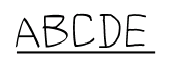
Unrecognizable region
An image region excluded from recognition. Use an unrecognizable region to exclude explanatory text or a picture that complicates field recognition. For more information, see Exclude a region from recognition.Unstructured document
A document containing information presented in a free form. Examples of such documents are contracts, letters, orders, and graphs. For more information, see Create Document Definitions for semi-structured and unstructured documents.User dictionary
An auxiliary dictionary created by the user that contains words not included in the built-in dictionaries. You can supplement built-in dictionaries with a user dictionary to improve the quality of data capture. A user dictionary typically contains specialized terms, abbreviations, and company names.V
Vendor
A legal entity or individual that sells goods or services. Vendors issue invoices for their goods and services. You can capture data from invoices with ABBYY FlexiCapture for Invoices.Verification
The process of checking that data has been recognized and pages have been assembled into documents correctly, and that rules returned no errors. In a standalone installation, verification is done on the Operator Station. In a distributed installation, verification is done on two stations:- The Data Verification Station, where recognition accuracy is verified
- The Verification Station, where all types of checks can be performed
W
Working batches
Document batches intended for data input. Only published Document Definitions are used to process working batches. For more information, see Batches.Writing style
An option for configuring the writing style of handprinted letters in forms. The writing style to choose depends on the region where forms are processed, for example, Russia, Germany, the Czech Republic, or the USA.X
XFD
XML Form Definition (*.xfd). The file format of a form designed with ABBYY FormDesigner. You use XFD files to create Document Definitions in ABBYY FlexiCapture.