
 in the FlexiLayout tree.
Barcode elements are used to find barcodes of the types supported by ABBYY FlexiLayout Studio. The program considers the Barcode objects that were detected during pre-recognition and that fall within the search area.
in the FlexiLayout tree.
Barcode elements are used to find barcodes of the types supported by ABBYY FlexiLayout Studio. The program considers the Barcode objects that were detected during pre-recognition and that fall within the search area.
Barcode element properties
Use the Barcode tab of the Properties dialog box to describe the corresponding object. To open the Properties dialog box, right-click the element in the FlexiLayout tree and select Properties… on the shortcut menu.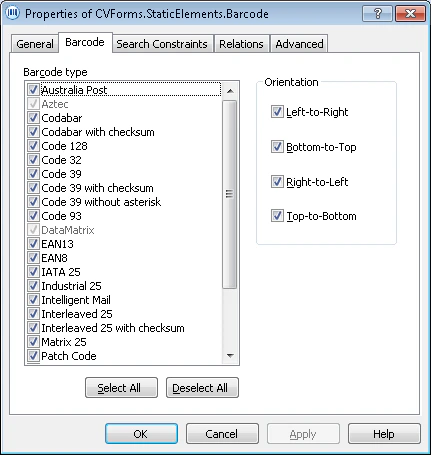
- To make the QRCode, Aztec, and DataMatrix types available, select Extract 2D barcodes: Data Matrix, Aztec, QR Code.
- To make postal barcodes available, select Extract post barcodes.
- Left-to-Right
- Bottom-to-Top
- Right-to-Left
- Top-to-Bottom
You can select more than one option.