- Static Text, which contains the name of the field.
- White Gap, which describes the gap between the name and the data of the field.
- An element that describes the contents of the field. Its type depends on the type of the field contents.
 in the tree.
If required, a Labeled Field element can be represented as a group.
When searching for the name of a field, the program considers the Recognized Words and Recognized Lines objects detected by pre-recognition that fall within the element’s search area. After the name of the field is detected, the program searches for a field whose contents match the description provided in the element.
in the tree.
If required, a Labeled Field element can be represented as a group.
When searching for the name of a field, the program considers the Recognized Words and Recognized Lines objects detected by pre-recognition that fall within the element’s search area. After the name of the field is detected, the program searches for a field whose contents match the description provided in the element.
Name properties
The name of a field is described by a Static Text element. The properties of the name are specified on the Label tab of the element’s Properties dialog box. To open the Properties dialog box, in the FlexiLayout window, right-click the element and select Properties… on the shortcut menu.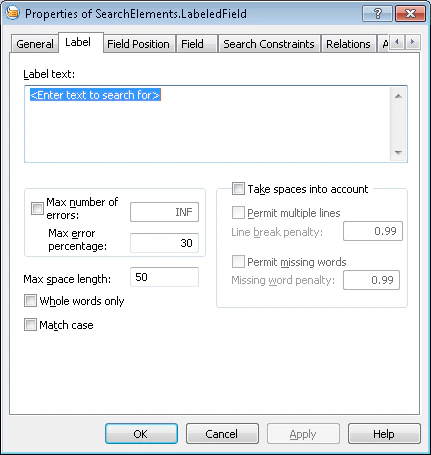
Position of a field relative to its name
The position of a field relative to its name is specified on the Field Position tab.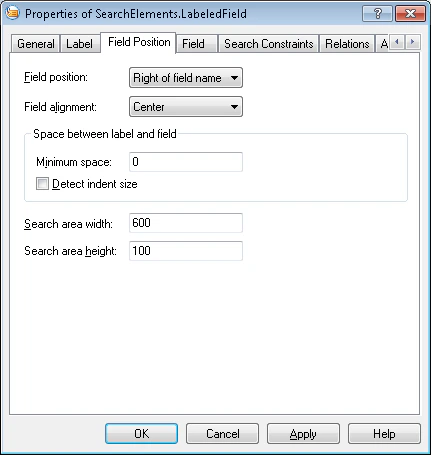
Field alignment specifies the alignment of the field’s search area relative to the rectangle enclosing the name. The value depends on the value of the Field Position field:
- If the field is positioned to the right or to the left of the name, its search area can be aligned by the top or bottom boundary, or centered.
- If the field is positioned above or below the name, its search area can be aligned by the left or right boundary, or centered.
Field search constraints
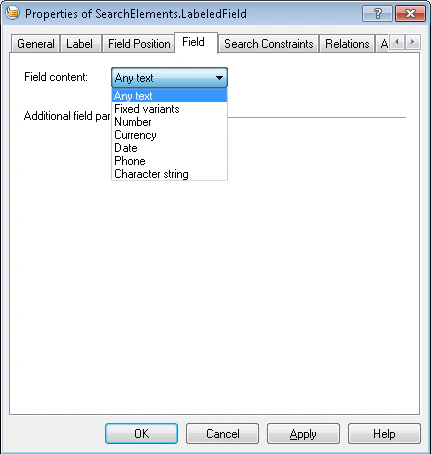
The search constraints for a field are specified on the Field tab.