
Create the InvoiceNumber element
1
Create the Character String element
In the InvoiceHeader element, create a Character String element and name it InvoiceNumber.
2
Specify the alphabet
Click the Character String tab and specify the alphabet:
-./0123456789ABCDEFGHIJKLMNOPQRSTUVWXYZabcdefghijklmnopqrstuvwxyz3
Set the non-alphabet character percentage
Set Percentage of non-alphabet characters to 30%.
4
Set the character count
In the Character count field, specify the fuzzy interval
{-1, 3, 20, INF} for the length of the character string, assuming that possible values fall in the range of 3 to 20 characters. Any hypothesis outside this interval is penalized.5
Exclude the kwInvoiceDate region
On some images, the search area for the Invoice Number field contains the already detected kwInvoiceDate element. Exclude this element from the search area, so that FlexiLayout Studio does not include this text in its hypotheses for the Invoice Number field: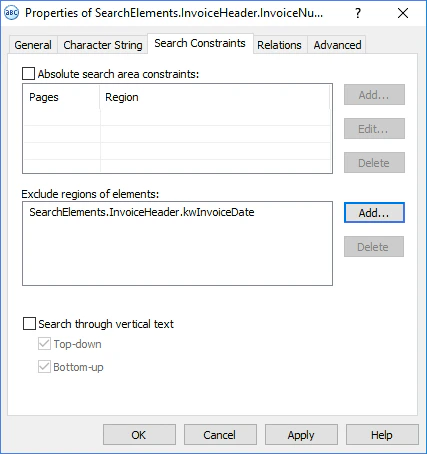
- On the Search Constraints tab, click Add… next to the Exclude regions of elements field.
- Select kwInvoiceDate from the list of elements.
- Click OK. The string
SearchElements.InvoiceHeader.kwInvoiceDateappears in the Exclude regions of elements field.
6
Add pre-search relations
Click the Advanced tab. In Advanced pre-search relations, specify additional conditions: if the name kwInvoiceNumber is not found, do not search for the InvoiceNumber field; otherwise, specify the search area as an array of rectangles, one to the right of the name and one below the name with a small offset. In the FlexiLayout language:
7
Add post-search relations
The search area for the field is limited to two rectangles, one to the right of the field name and one beneath it. When the field data is to the right of the name, there is often other text beneath the field (on the test images, most commonly the name and data of the Date field). Because this extraneous text falls in the search area for the Invoice Number field, FlexiLayout Studio generates a hypothesis for it. To influence the quality of this hypothesis, specify additional checks in the Advanced post-search relations field: the lower the text beneath the field name, the bigger the penalty. In the FlexiLayout language:
8
Match the FlexiLayout
Temporarily exclude the InvoiceFooter element and match the FlexiLayout.
9
Set the block region
Specify the location of the InvoiceNumber block as the rectangular region of the InvoiceNumber element enlarged by 5 dots vertically and horizontally. Select Expression and type this expression: