
Postponed tasks and tasks assigned to a specific operator can be returned to the general queue either manually or automatically.
Set a timeout for postponed tasks
IIS Manager sets how long a postponed task waits before returning to the general queue. Every 60 minutes the Processing Server checks for timed out tasks and returns them.1
Open IIS Manager
Click Control Panel → System and Security → Administrative Tools → Internet Information Services (IIS) Manager.
2
Open the Application Settings for the server
In IIS Manager, click Sites → Default Web Site → FlexiCapture12 → Server → Application Settings.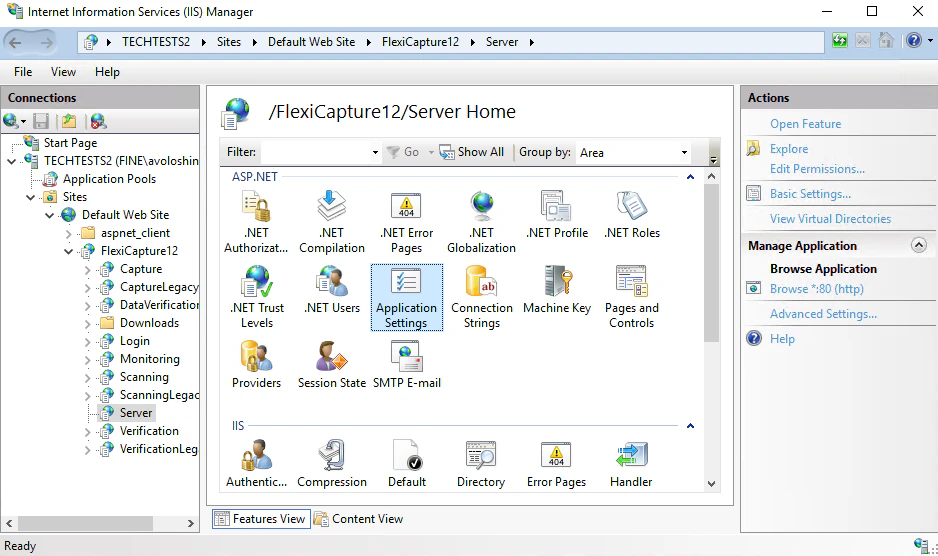
3
Set the timeout in minutes
Enter a value in minutes in the 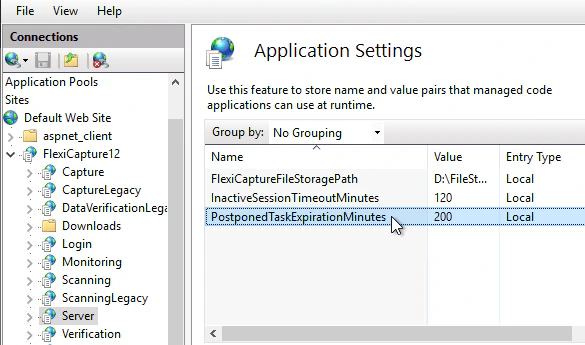
PostponedTaskExpirationMinutes parameter. The default is 0. If the parameter is missing in IIS Manager, add it and then specify a value.Set a timeout for postponed rescanning tasks
IIS Manager sets how long a postponed rescanning task waits before returning to the general queue. Every 60 minutes the Processing Server checks for timed out rescanning tasks and returns them.1
Open IIS Manager
Click Control Panel → System and Security → Administrative Tools → Internet Information Services (IIS) Manager.
2
Open the Application Settings for the server
In IIS Manager, click Sites → Default Web Site → FlexiCapture12 → Server → Application Settings.
3
Set the timeout in minutes
Enter a value in minutes in the 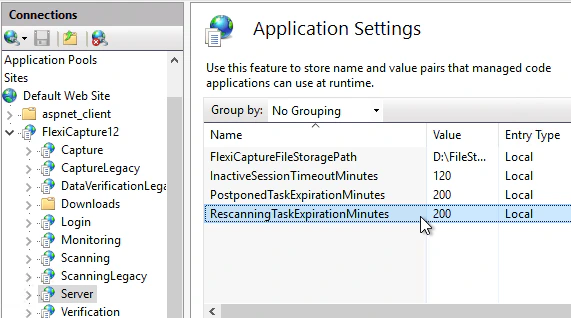
RescanningTaskExpirationMinutes parameter. The default is 0. If the parameter is missing in IIS Manager, add it and then specify a value.Set a timeout for tasks assigned to specific operators
IIS Manager sets how long a task stays assigned to a specific operator. Every 60 minutes the Processing Server checks for timed out assigned tasks and returns them to the general queue.1
Open IIS Manager
Click Control Panel → System and Security → Administrative Tools → Internet Information Services (IIS) Manager.
2
Open the Application Settings for the server
In IIS Manager, click Sites → Default Web Site → FlexiCapture12 → Server → Application Settings.
3
Set the timeout in minutes
Enter a value in minutes in the 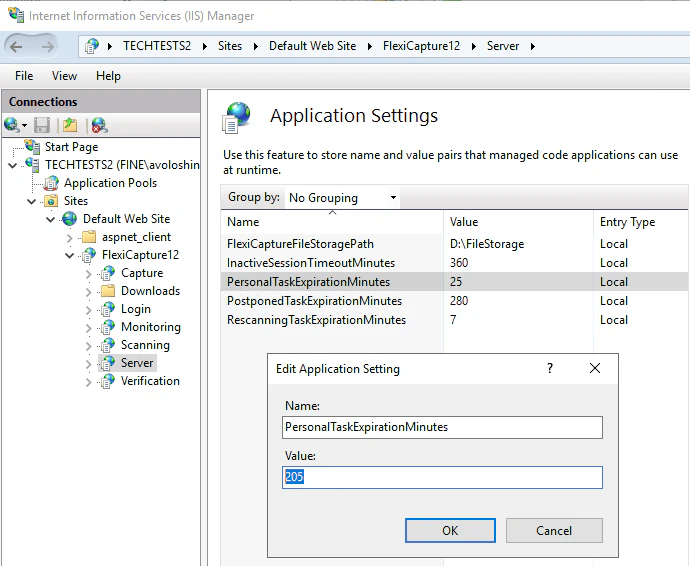
PersonalTaskExpirationMinutes parameter. The default is 0. If the parameter is missing in IIS Manager, add it and then specify a value.