HTML フラグメントは、複数文書処理のCaseで使用するユーザーインターフェースの一部を表示します。
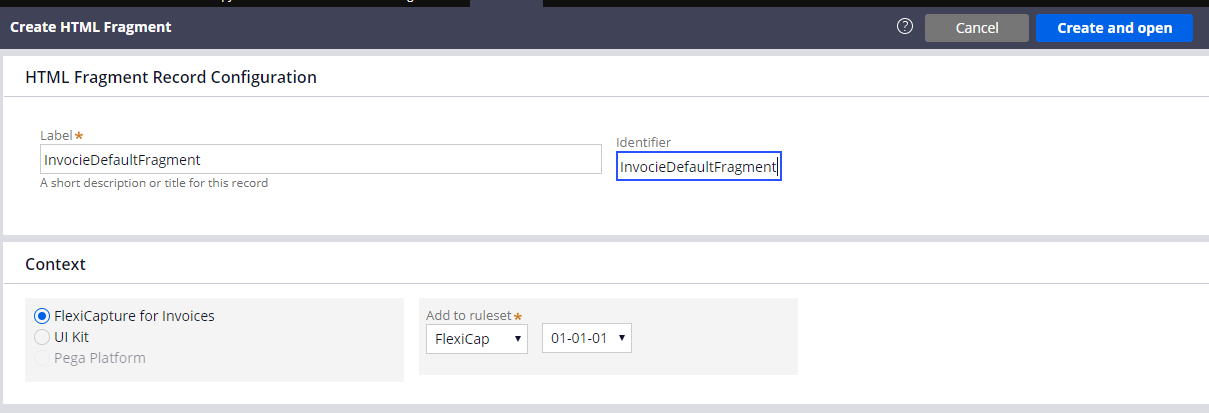
新しいフラグメントを作成するには、次の手順を実行します。
- Dev Studio で、Records → Technical → HTML Fragment → Create をクリックします。
- Label フィールドと Identifier フィールドに、次の値を入力します: InvoiceDefaultFragment。
- Create and open をクリックします。
- HTML Source フィールドに、フラグメントのコードを入力します。各フラグメントで使用するコードは、以下に記載されています。
すべてのフラグメントのコードは、コネクターのインストールフォルダー内の %Installation Path%\Connector for FlexiCapture as a Service with verification\Samples\Code examples\Configure UI\Multi-document\HTML fragments にもあります。
<head>
<meta charset="utf-8" />
<style>
* {
box-sizing: border-box;
}
.value {
color: black;
}
.name{
color: grey;
}
.invoicecolumn {
float: left;
width: 50%;
padding: 10px;
height: 130px;
}
.row:after {
content: "";
display: table;
clear: both;
}
</style>
</head>
<h1>
請求書 <br> <hr>
</h1>
<div class="row">
<div class="invoicecolumn">
<p> <span class="name"> 請求書番号 </span> <br> <span class="value"> ---- </span> </p>
<p> <span class="name"> 請求日 </span> <br> <span class="value"> ---- </span> </p>
</div>
<div class="invoicecolumn">
<p> <span class="name"> 住所 </span> <br> <span class="value"> ---- </span> </p>
</div>
</div>
<h4>請求書テーブル</h4>
<table style="width:100%">
<tr>
<th>参照</th>
<th>品名</th>
<th>数量</th>
<th>注文番号</th>
<th>単価</th>
<th>合計金額</th>
</tr>
</table>
<p> <span class="name"> 合計金額 </span> <br> <span class="value"> ---- </span> </p>
<p> <span class="name"> 会社名 </span> <br> <span class="value"> ---- </span> </p>
<br>
<h1>
Banking <br> <hr>
</h1>
<div class="row">
<div class="bankingcolumn">
<p> <span class="name"> Full Name </span> <br> <span class="value"> ---- </span> </p>
<p> <span class="name"> City </span> <br> <span class="value"> ---- </span> </p>
<p> <span class="name"> Birth Date </span> <br> <span class="value"> ---- </span> </p>
<p> <span class="name"> SSN </span> <br> <span class="value"> ---- </span> </p>
</div>
<div class="bankingcolumn">
<p> <span class="name"> Home Phone </span> <br> <span class="value"> ---- </span> </p>
<p> <span class="name"> Work Phone </span> <br> <span class="value"> ---- </span> </p>
<p> <span class="name"> Employer Name </span> <br> <span class="value"> ---- </span> </p>
</div>
</div>
<h4>住所</h4>
<table style="width:100%">
<tr>
<th>Address type</th>
<th>Country</th>
<th>ZIP</th>
<th>State</th>
<th>Street</th>
<th>City</th>
</tr>
</table>
<br>
<h1>
契約 <br> <hr>
</h1>
<p> <span class="name"> 契約番号 </span> <br> <span class="value"> ---- </span> </p>
<p> <span class="name"> 契約日 </span> <br> <span class="value"> ---- </span> </p>
<br>
<h1>
レター <br> <hr>
</h1>
<p> <span class="name"> レターの日付 </span> <br> <span class="value"> ---- </span> </p>
<p> <span class="name"> 差出人 </span> <br> <span class="value"> ---- </span> </p>
<p> <span class="name"> 宛先 </span> <br> <span class="value"> ---- </span> </p>
<br>
<h1>
Price <br> <hr>
</h1>
<p> <span class="name"> Company </span> <br> <span class="value"> ---- </span> </p>
<h4>Price Table</h4>
<table style="width:100%">
<tr>
<th>品名</th>
<th>単価</th>
</tr>
</table>