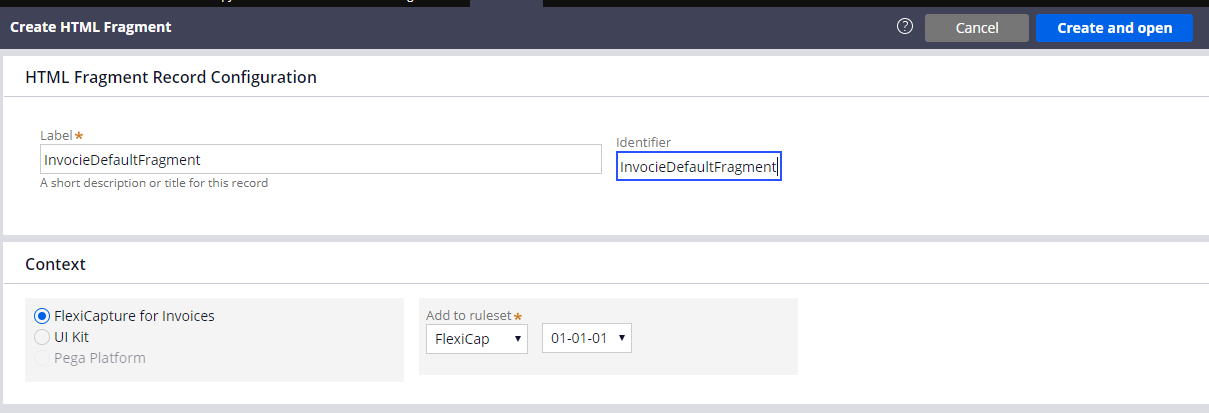
HTML-Fragmente stellen Teile der Benutzeroberfläche dar, die in einem Anwendungsfall zur Verarbeitung mehrerer Dokumente verwendet werden.
Gehen Sie wie folgt vor, um ein neues Fragment zu erstellen:
- Klicken Sie in Dev Studio auf Records → Technical → HTML Fragment → Create.
- Geben Sie in die Felder Label und Identifier den folgenden Wert ein: InvoiceDefaultFragment.
- Klicken Sie auf Create and open.
- Geben Sie in das Feld HTML Source den Code für Ihr Fragment ein. Der für die einzelnen Fragmente zu verwendende Code ist unten angegeben.
Den Code für alle Fragmente finden Sie auch im Installationsordner des Connectors unter %Installation Path%\Connector for FlexiCapture as a Service with verification\Samples\Code examples\Configure UI\Multi-document\HTML fragments.
<head>
<meta charset="utf-8" />
<style>
* {
box-sizing: border-box;
}
.value {
color: black;
}
.name{
color: grey;
}
.invoicecolumn {
float: left;
width: 50%;
padding: 10px;
height: 130px;
}
.row:after {
content: "";
display: table;
clear: both;
}
</style>
</head>
<h1>
Rechnung <br> <hr>
</h1>
<div class="row">
<div class="invoicecolumn">
<p> <span class="name"> Rechnungsnummer </span> <br> <span class="value"> ---- </span> </p>
<p> <span class="name"> Rechnungsdatum </span> <br> <span class="value"> ---- </span> </p>
</div>
<div class="invoicecolumn">
<p> <span class="name"> Adresse </span> <br> <span class="value"> ---- </span> </p>
</div>
</div>
<h4>Rechnungstabelle</h4>
<table style="width:100%">
<tr>
<th>Referenz</th>
<th>Bezeichnung</th>
<th>Menge</th>
<th>Bestellnummer</th>
<th>Stückpreis</th>
<th>Gesamtbetrag</th>
</tr>
</table>
<p> <span class="name"> Gesamtbetrag </span> <br> <span class="value"> ---- </span> </p>
<p> <span class="name"> Unternehmen </span> <br> <span class="value"> ---- </span> </p>
<br>
<h1>
Banking <br> <hr>
</h1>
<div class="row">
<div class="bankingcolumn">
<p> <span class="name"> Full Name </span> <br> <span class="value"> ---- </span> </p>
<p> <span class="name"> City </span> <br> <span class="value"> ---- </span> </p>
<p> <span class="name"> Birth Date </span> <br> <span class="value"> ---- </span> </p>
<p> <span class="name"> SSN </span> <br> <span class="value"> ---- </span> </p>
</div>
<div class="bankingcolumn">
<p> <span class="name"> Home Phone </span> <br> <span class="value"> ---- </span> </p>
<p> <span class="name"> Work Phone </span> <br> <span class="value"> ---- </span> </p>
<p> <span class="name"> Employer Name </span> <br> <span class="value"> ---- </span> </p>
</div>
</div>
<h4>Adresse</h4>
<table style="width:100%">
<tr>
<th>Address type</th>
<th>Country</th>
<th>ZIP</th>
<th>State</th>
<th>Street</th>
<th>City</th>
</tr>
</table>
<br>
<h1>
Vertrag <br> <hr>
</h1>
<p> <span class="name"> Vertragsnummer </span> <br> <span class="value"> ---- </span> </p>
<p> <span class="name"> Vertragsdatum </span> <br> <span class="value"> ---- </span> </p>
<br>
<h1>
Brief <br> <hr>
</h1>
<p> <span class="name"> Briefdatum </span> <br> <span class="value"> ---- </span> </p>
<p> <span class="name"> Brief von </span> <br> <span class="value"> ---- </span> </p>
<p> <span class="name"> Brief an </span> <br> <span class="value"> ---- </span> </p>
<br>
<h1>
Price <br> <hr>
</h1>
<p> <span class="name"> Unternehmen </span> <br> <span class="value"> ---- </span> </p>
<h4>Price Table</h4>
<table style="width:100%">
<tr>
<th>Designation</th>
<th>Stückpreis</th>
</tr>
</table>