Saltar al contenido principal
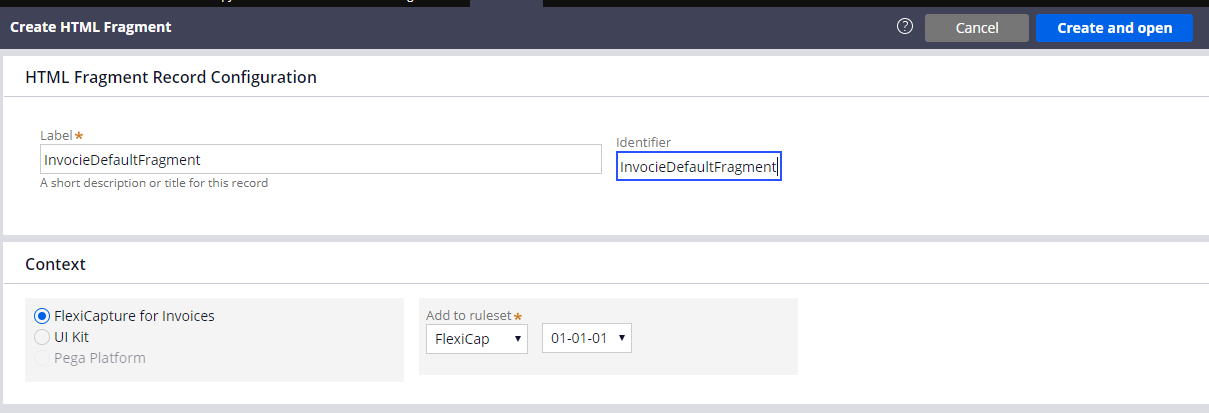
Los fragmentos HTML muestran partes de la interfaz de usuario que se utilizan en un caso de procesamiento de varios documentos. Para crear un nuevo fragmento, haga lo siguiente:
  1. En Dev Studio, haga clic en Records → Technical → HTML Fragment Create.
  2. En los campos Label e Identifier, escriba el siguiente valor: InvoiceDefaultFragment.
  1. Haga clic en Create and open.
  2. En el campo HTML Source, escriba el código del fragmento. A continuación se proporciona el código que debe usarse para cada uno de los fragmentos.
El código de todos los fragmentos también puede encontrarse en la carpeta de instalación del conector: %Installation Path%\Connector for FlexiCapture as a Service with verification\Samples\Code examples\Configure UI\Multi-document\HTML fragments.

InvoiceDefaultFragment

<head>
    <meta charset="utf-8" />
        <style>
          * {
            box-sizing: border-box;
          }
          .value {
            color: black; 
          }
          .name{
            color: grey;
          }
          .invoicecolumn {
            float: left;
            width: 50%;
            padding: 10px;
            height: 130px; 
          }
          .row:after {
            content: "";
            display: table;
            clear: both;
          }
        </style>
</head>
<h1>
  Factura <br> <hr>
</h1>
<div class="row">
  <div class="invoicecolumn">
    <p> <span class="name"> Número de factura </span> <br> <span class="value"> ---- </span> </p>
    <p> <span class="name"> Fecha de la factura </span> <br> <span class="value"> ---- </span> </p>
  </div>
  <div class="invoicecolumn">
    <p> <span class="name"> Dirección </span> <br> <span class="value"> ---- </span> </p>
  </div>
</div>
<h4>Tabla de factura</h4> 
<table style="width:100%">
  <tr>
    <th>Referencia</th>
    <th>Designación</th> 
    <th>Cantidad</th>
    <th>Número de pedido</th>
    <th>Precio unitario</th> 
    <th>Total</th>
  </tr>
</table>
<p> <span class="name"> Total </span> <br> <span class="value"> ---- </span> </p>
<p> <span class="name"> Empresa </span> <br> <span class="value"> ---- </span> </p>
<br>

BankingDefaultFragment

<h1>
  Banca <br> <hr>
</h1>
<div class="row">
  <div class="bankingcolumn">
    <p> <span class="name"> Nombre Completo </span> <br> <span class="value"> ---- </span> </p>
    <p> <span class="name"> Ciudad </span> <br> <span class="value"> ---- </span> </p>
    <p> <span class="name"> Fecha de Nacimiento </span> <br> <span class="value"> ---- </span> </p>
    <p> <span class="name"> SSN </span> <br> <span class="value"> ---- </span> </p>
  </div>
  <div class="bankingcolumn">
    <p> <span class="name"> Teléfono de Casa </span> <br> <span class="value"> ---- </span> </p>
    <p> <span class="name"> Teléfono del Trabajo </span> <br> <span class="value"> ---- </span> </p>
    <p> <span class="name"> Nombre del Empleador </span> <br> <span class="value"> ---- </span> </p>
  </div>
</div>
<h4>Dirección</h4> 
<table style="width:100%">
  <tr>
    <th>Tipo de dirección</th>
    <th>País</th> 
    <th>ZIP</th>
    <th>Estado</th>
    <th>Calle</th> 
    <th>Ciudad</th>
  </tr>
</table>
<br>

ContractDefaultFragment

<h1>
  Contrato <br> <hr>
</h1>
<p> <span class="name"> Número de Contrato </span> <br> <span class="value"> ---- </span> </p>
<p> <span class="name"> Fecha de Contrato </span> <br> <span class="value"> ---- </span> </p>
<br>

LetterDefaultFragment

<h1>
  Carta <br> <hr>
</h1>
<p> <span class="name"> Fecha de la carta </span> <br> <span class="value"> ---- </span> </p>
<p> <span class="name"> Carta de </span> <br> <span class="value"> ---- </span> </p>
<p> <span class="name"> Carta para </span> <br> <span class="value"> ---- </span> </p>
<br>

PriceDefaultFragment

<h1>
  Price <br> <hr>
</h1>
<p> <span class="name"> Company </span> <br> <span class="value"> ---- </span> </p>
<h4>Price Table</h4> 
<table style="width:100%">
  <tr>
    <th>Designation</th>
    <th>Precio unitario</th> 
  </tr>
</table>