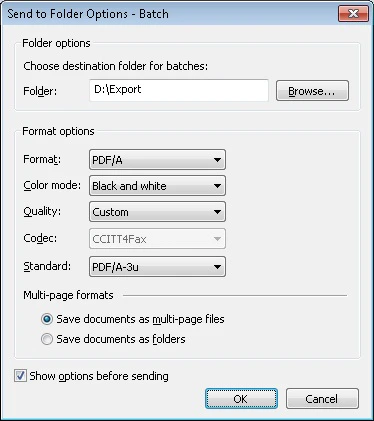
Option | Description |
Export Folder | |
Folder | Select this option to specify the path to the folder where document batches are to be saved. Click Browse… to select an existing folder. |
Browse…(button) | Click this button to browse to an existing folder. |
Format Options | |
Format(drop-down list) | Select the desired file format:
|
Standard (drop-down list) | If PDF/A is specified in the Format field, select one of the following versions of the PDF/A format for output files:
Note. You can use the IImageSavingOptions object to export to PDF/A. |
Color mode (drop-down list) | Select the desired color mode:
|
Quality (drop-down list) | Select the quality of saved images:
|
Multi-page format options | Select a method for saving documents in batches:
|
Show options before sending | Disable this option if you want to use the same options next time you export data to a local folder. In this case the dialog box will not appear when the next export process starts. |