To describe the location of the block corresponding to the DATE YOU ARRIVED AT THE EARTH field:
  1. Create an element of type Static Text and name it DateHeader. This element will correspond to the name of the DATE YOU ARRIVED AT THE EARTH field.
  2. Create an element of type Date and name it ArrivalDate. This element will correspond to the DATE YOU ARRIVED AT THE EARTH field proper.
  3. Create a block and name it ArrivalDate. This block will correspond to the DATE YOU ARRIVED AT THE EARTH field.
The elements and the block for this field are created as described in Steps 10 to 14 with the following exceptions:
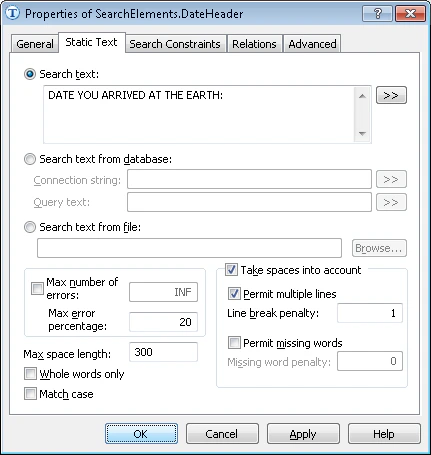
  • Unlike for the PlanetNameHeader element, enter the text in the Search text field with spaces: DATE YOU ARRIVED AT THE EARTH. Select the Take spaces into account and Permit multiple lines options and set Line break penalty to 1.
    Screenshot of the Static Text tab of the DateHeader element properties in ABBYY FlexiLayout Studio showing the search text entered with spaces and the Take spaces into account and Permit multiple lines options selected.
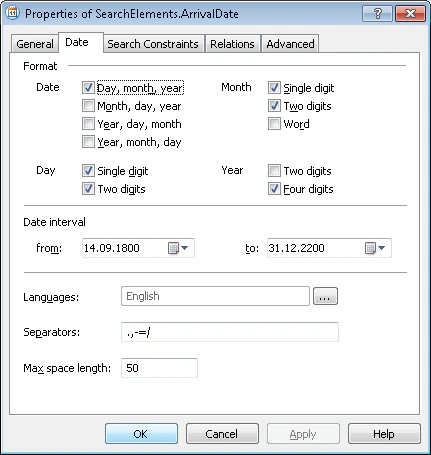
  • For the DATE YOU ARRIVED AT THE EARTH field, create an element of type Date and name it ArrivalDate. For the ArrivalDate element, specify all the possible date formats on the Date tab. Assume that months are always written in digits and the year is always a 4-digit number. Clear the Word box in the Month group and the Two digits box in the Year group. Other options may be left unchanged.
    Screenshot of the Date tab of the ArrivalDate element properties in ABBYY FlexiLayout Studio showing the date formats configured with the Word and Two digits options cleared.
  • When defining the search area for the ArrivalDate element, specify the DateHeader element as the reference element.
  • When creating the ArrivalDate block, specify the ArrivalDate element as the source element.