
Errors that do not appear in the WinActor log
If the UsageExample scenario fails but the WinActor OR-5200 log has no entries for the error, use a script to enable logging by theAbbyy.FlexiCapture.WebApi.Client.dll library.
1
Open the Configure library
Double-click the Configure user library in the workspace of the Flowchart window.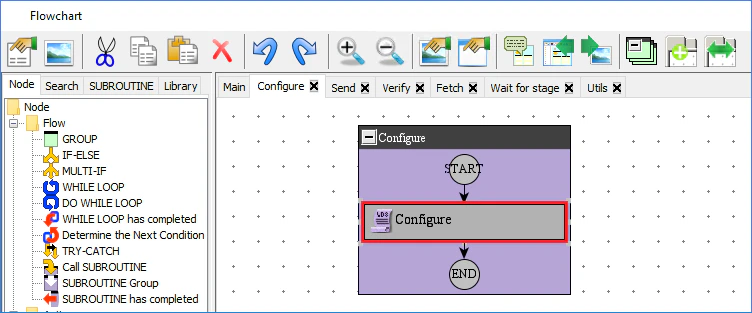
2
Add the log file path to the script
In the Property - Run the script window, click the Script tab and add the following line to the 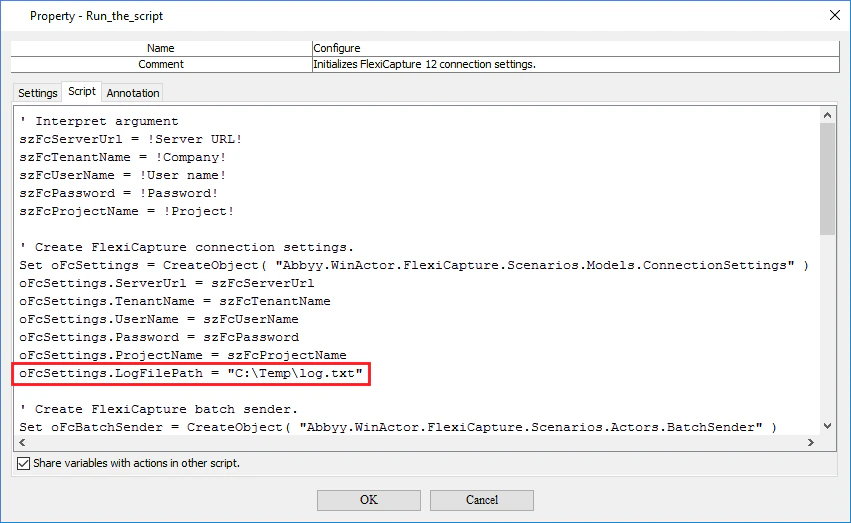
Create FlexiCapture connection settings section of the script:3
Save the changes
Click OK.
4
Run the scenario
Click Run. The scenario then creates a log file at
C:\Temp\log.txt. You can change the location of the log file if necessary.5
Send the log to support
Send the log file to ABBYY Support.