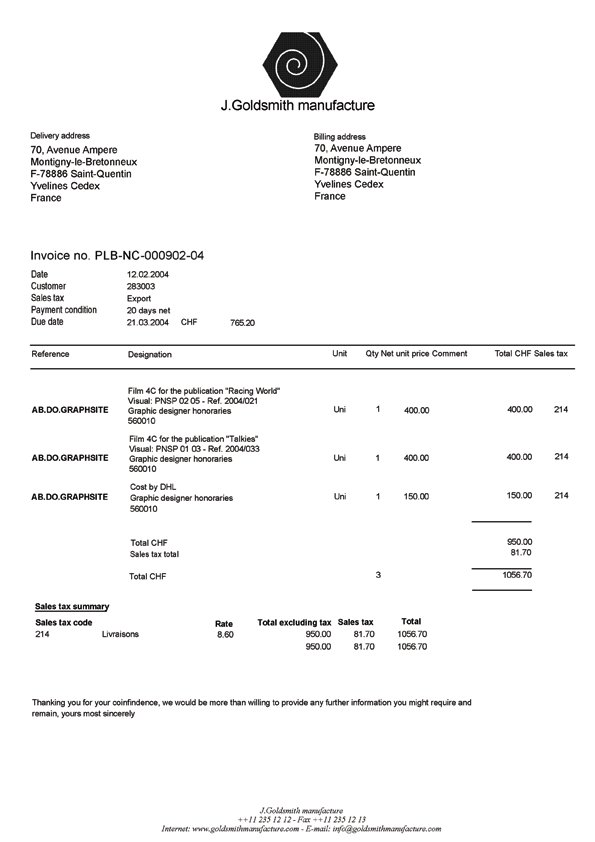
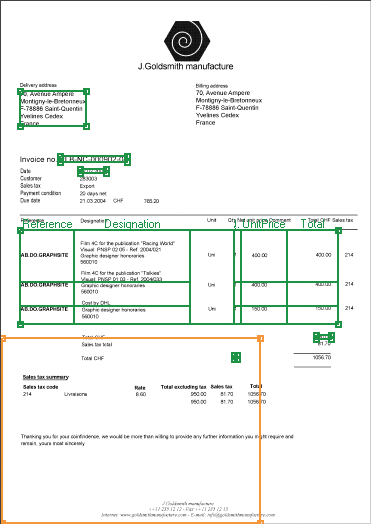
For the sake of simplicity, this sample uses a one-page document to describe the creation of a FlexiLayout for a simple invoice. Compared to the previous samples, this one includes a table.
This sample guides you through all the steps of FlexiLayout creation and, at the same time, teaches you some tricks you can use to describe the position of objects. Most importantly, it teaches you how to detect image objects that correspond to Table elements.
This sample refers to Sample 1 and Sample 2, which describe the creation of FlexiLayouts with blocks and elements of various types (except tables). Some of the basic operations are described there in greater detail.
The FlexiLayout Studio project with the test images and a ready-made FlexiLayout is located in %public%\ABBYY\FlexiCapture\12.0\Samples\FLS\English\Invoice One-Page.
The sample document is a simple but typical invoice. It differs from the previous examples in that it has a table field and some of its fields can be absent.
The following sections provide step-by-step instructions for creating a FlexiLayout.
The purpose of a FlexiLayout for this document is to ensure reliable detection of the following fields on all the test images (provided they occur on a document):
- Invoice Number
- Invoice Date
- Delivery Address
- Total Quantity
- Total Amount
- Country
- Invoice Table (only the following columns: Reference, Designation, Quantity, Unit Price, Total)