What the transaction holds
Receive the transaction data
Extract the data in a UiPath process. The distribution package includes an example of such a process, ABBYY FlexiCapture 12 Receiver, in theSamples folder.
1
Connect the Robot to Orchestrator
Connect your Robot to Orchestrator, the one that script exporting from ABBYY FlexiCapture is set up for.
2
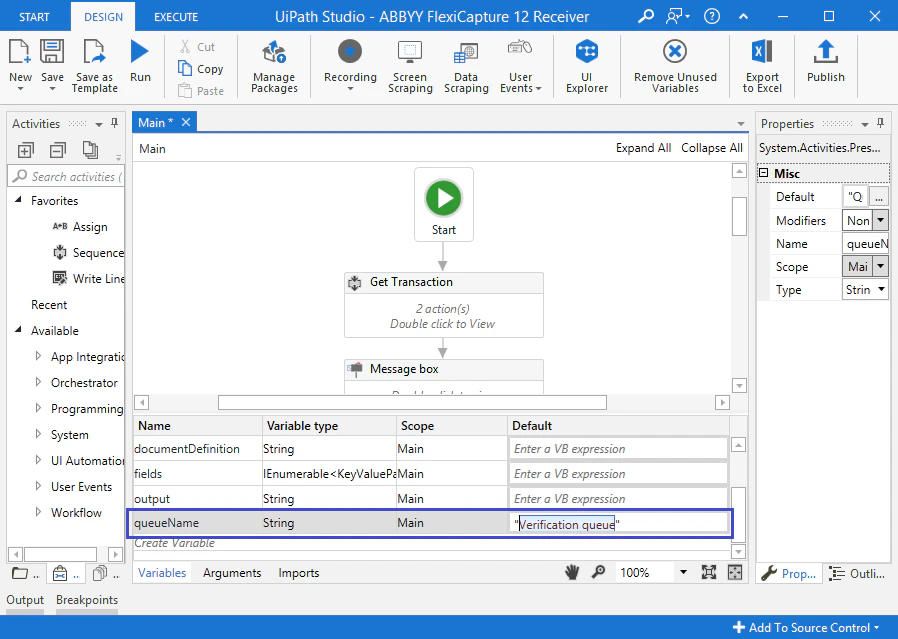
Specify the queue to read from
- Click the Get Transaction activity.
- On the Variables tab, find the queueName variable.
- In the Default field of this variable, specify the name of the queue to take a transaction from.
3
Receive the transaction from the queue
The process receives the transaction and stores it in a variable of type
QueueItem.The sample process handles the first transaction that has the New status in the queue, so launching the process once processes one transaction.4
Select a folder for the data
The sample process displays a window where you select the folder to save the transaction data into.
5
Deserialize the transaction rows
Extract the rows of the received transaction and deserialize them into a JSON object using the Deserialize json activity. Store the JSON objects received for each of the Specific Content Items in variables of the following types:
- DocumentDefinition –
String - BatchRegistrationParameters, Fields, and Files –
IEnumerable<KeyValuePair<string, string>>