
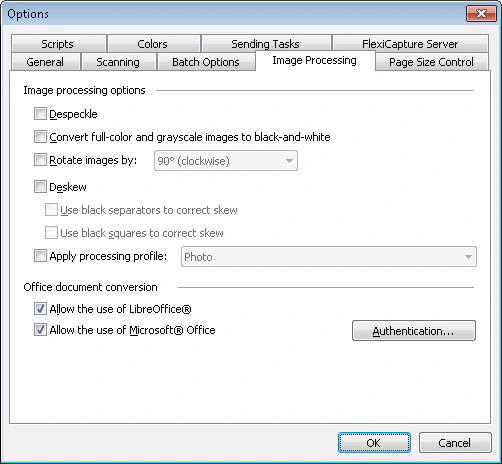
- Images that use the options dialog box settings.
- Batches of certain types configured in the Batch Type Properties dialog box.
Automatic image processing may considerably slow down image loading.
Image processing operations
The following image processing operations are available:Import office files
Besides document images, you can import common office files, and you can import both in one flow. Office files are converted to PDFs using a built-in tool. To convert files with a third-party application instead, enable one of the following options:- Allow the use of LibreOffice® – Converts files with LibreOffice (supports LibreOffice 4.2, 4.3, 4.4, 5, 6.3, and 6.4).
- Allow the use of Microsoft® Office – Converts files with Microsoft Office (supports Microsoft Office 2010, 2013, 2016, and 2019).
- Processing results may vary depending on the application you use.
- If you import from email, message bodies can be used as documents.
- If both third-party options are enabled, FlexiCapture selects the best option automatically and logs its choice in the task log.
- Conversion with a third-party application works only if that application is installed on the processing station used to import documents.
- To convert with Microsoft Office, the application must be activated, and the conversion must run under a user account with administrator permissions on the processing computer. To open the authentication dialog box, click Authentication….
- Remote processing stations do not support the office file processing module.
- If the Send text layers of pages option is enabled on the Send To tab of the batch type properties, FlexiCapture receives a PDF with a text layer.
Restore the original image
If you are not satisfied with the results of automatic or manual image processing, you can revert to the original image without rescanning the document. To restore the original image, right-click the page and click Back to Source Image on the shortcut menu. This option is available only if you have made any changes to the original image.Process images with scripts
You can use scripts to process images. For example:1
Set the image saving options
In the IImageSavingOptions interface, specify the values of the
ColorType and Format properties and set UseRawImage to true.2
Save the image
Save the image using this method: