Before sending image files from Blue Prism to ABBYY FlexiCapture using the ABBYY FlexiCapture 12 VBO, separate the documents into one file per document.
ABBYY FlexiCapture as an unattended service
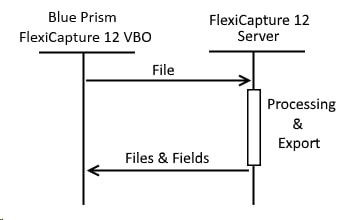
Files are sent synchronously from Blue Prism to ABBYY FlexiCapture 12, and no verification is required. The FlexiCapture 12 VBO runs on the Blue Prism side. It sends a file to ABBYY FlexiCapture 12 and gets back extracted fields and exported files. Files that do not require verification go straight from recognition to the export stage.The ABBYY FlexiCapture operator must have the Scanning Operator or Administrator role for the given project and batch type. The administrator grants these roles in the Administration and Monitoring Console.
ABBYY FlexiCapture as input
Files and data are sent synchronously from ABBYY FlexiCapture 12 to Blue Prism. The FlexiCapture Export Connector runs at the export stage in ABBYY FlexiCapture 12, according to a script export profile. It sends files and extracted fields to the FlexiCapture 12 Listener web service. ABBYY FlexiCapture 12 can receive the image files from the Scanning Station or the FlexiCapture Mobile Client, for example.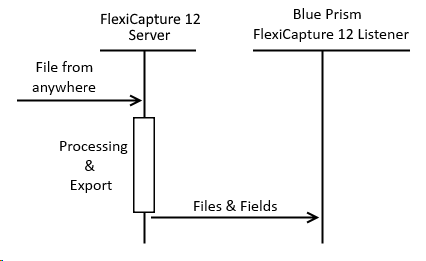
ABBYY FlexiCapture as an attended service
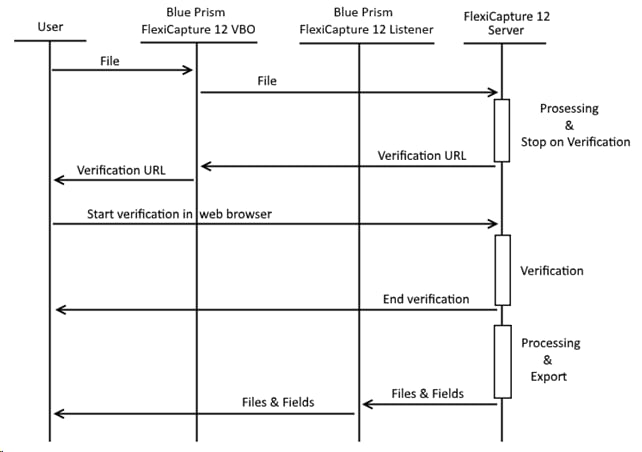
Files are sent asynchronously from Blue Prism to ABBYY FlexiCapture 12, and verification is required. The FlexiCapture 12 VBO sends a file to ABBYY FlexiCapture 12 and gets back a URL linking to a document verification page on the Web Verification Station. The user opens the link and verifies the document. After verification, a script export profile runs on the ABBYY FlexiCapture 12 side, which makes the FlexiCapture Export Connector send the files and extracted field data to the FlexiCapture 12 Listener web service.The ABBYY FlexiCapture operator must have both the Scanning Operator role, to send documents, and the Verification Operator role, to receive the verification URL, for the given project and batch type. The Administrator role covers both.