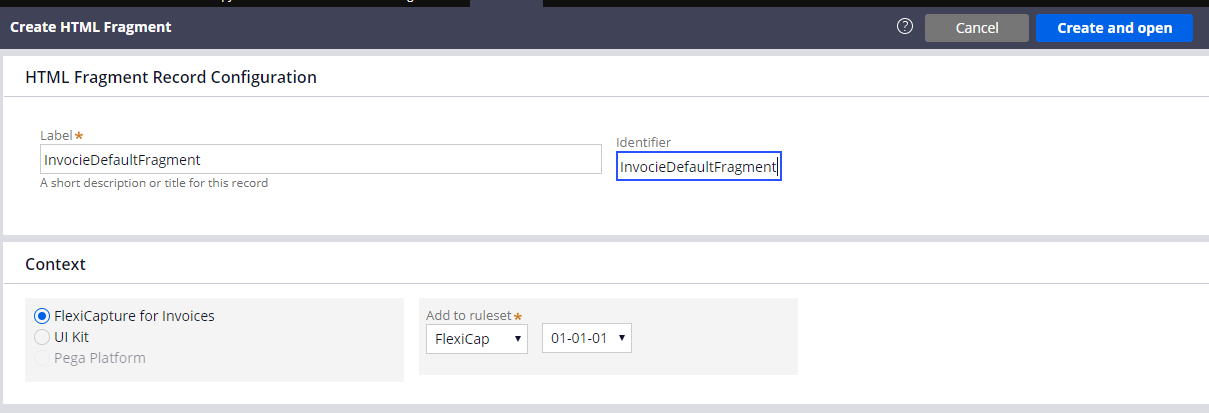
HTML fragments draw parts of the user interface used for a multi-document processing case. To create a new fragment, do the following:
  1. In Dev Studio, click Records → Technical → HTML Fragment Create.
  2. In the Label and Identifier fields, enter the following value: InvoiceDefaultFragment.
  1. Click Create and open.
  2. In the HTML Source field, enter the code of your fragment. The code to be used for each of the fragments is provided below.
The code of all the fragments can also be found in the connector installation folder at %Installation Path%\Connector for FlexiCapture as a Service with verification\Samples\Code examples\Configure UI\Multi-document\HTML fragments.

InvoiceDefaultFragment

<head>
    <meta charset="utf-8" />
        <style>
          * {
            box-sizing: border-box;
          }
          .value {
            color: black; 
          }
          .name{
            color: grey;
          }
          .invoicecolumn {
            float: left;
            width: 50%;
            padding: 10px;
            height: 130px; 
          }
          .row:after {
            content: "";
            display: table;
            clear: both;
          }
        </style>
</head>
<h1>
  Invoice <br> <hr>
</h1>
<div class="row">
  <div class="invoicecolumn">
    <p> <span class="name"> Invoice Number </span> <br> <span class="value"> ---- </span> </p>
    <p> <span class="name"> Invoice Date </span> <br> <span class="value"> ---- </span> </p>
  </div>
  <div class="invoicecolumn">
    <p> <span class="name"> Address </span> <br> <span class="value"> ---- </span> </p>
  </div>
</div>
<h4>Invoice Table</h4> 
<table style="width:100%">
  <tr>
    <th>Reference</th>
    <th>Designation</th> 
    <th>Quantity</th>
    <th>Order Number</th>
    <th>Unit Price</th> 
    <th>Total</th>
  </tr>
</table>
<p> <span class="name"> Total </span> <br> <span class="value"> ---- </span> </p>
<p> <span class="name"> Company </span> <br> <span class="value"> ---- </span> </p>
<br>

BankingDefaultFragment

<h1>
  Banking <br> <hr>
</h1>
<div class="row">
  <div class="bankingcolumn">
    <p> <span class="name"> Full Name </span> <br> <span class="value"> ---- </span> </p>
    <p> <span class="name"> City </span> <br> <span class="value"> ---- </span> </p>
    <p> <span class="name"> Birth Date </span> <br> <span class="value"> ---- </span> </p>
    <p> <span class="name"> SSN </span> <br> <span class="value"> ---- </span> </p>
  </div>
  <div class="bankingcolumn">
    <p> <span class="name"> Home Phone </span> <br> <span class="value"> ---- </span> </p>
    <p> <span class="name"> Work Phone </span> <br> <span class="value"> ---- </span> </p>
    <p> <span class="name"> Employer Name </span> <br> <span class="value"> ---- </span> </p>
  </div>
</div>
<h4>Address</h4> 
<table style="width:100%">
  <tr>
    <th>Address type</th>
    <th>Country</th> 
    <th>ZIP</th>
    <th>State</th>
    <th>Street</th> 
    <th>City</th>
  </tr>
</table>
<br>

ContractDefaultFragment

<h1>
  Contract <br> <hr>
</h1>
<p> <span class="name"> Contract Number </span> <br> <span class="value"> ---- </span> </p>
<p> <span class="name"> Contract Date </span> <br> <span class="value"> ---- </span> </p>
<br>

LetterDefaultFragment

<h1>
  Letter <br> <hr>
</h1>
<p> <span class="name"> Letter Date </span> <br> <span class="value"> ---- </span> </p>
<p> <span class="name"> Letter From </span> <br> <span class="value"> ---- </span> </p>
<p> <span class="name"> Letter To </span> <br> <span class="value"> ---- </span> </p>
<br>

PriceDefaultFragment

<h1>
  Price <br> <hr>
</h1>
<p> <span class="name"> Company </span> <br> <span class="value"> ---- </span> </p>
<h4>Price Table</h4> 
<table style="width:100%">
  <tr>
    <th>Designation</th>
    <th>Unit Price</th> 
  </tr>
</table>