
Prerequisites
Install one of the following before you set up the connector:- ABBYY FlexiCapture Project Setup Station, if you are using ABBYY FlexiCapture Distributed Edition. Use version 11 with Appian 11, and version 12 with Appian 12.
- Administrator Station, if you are using ABBYY FlexiCapture Standalone Edition.
How export settings are organized
ABBYY FlexiCapture uses projects to process documents. ABBYY FlexiCapture identifies the type of each document and applies the Document Definition prepared for that type. Every Document Definition has one or more export profiles, which determine how document images and data are exported.Open a project from ABBYY FlexiCapture Cloud (Appian 12)
ABBYY FlexiCapture Cloud additionally requires the Project Setup Station desktop application to configure your project.1
Open the Open Project from Server dialog box
In the Project Setup Station, click File → Open Project from Server.
2
Specify the server and credentials
- Specify the address of the ABBYY FlexiCapture server.
- Specify the name of your company in the Tenant name field.
- Select the Use server authentication option and enter your credentials.
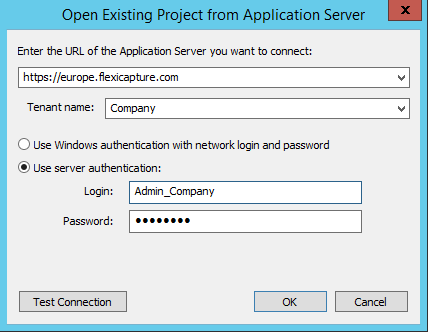
3
Test the connection and open the project
Click Test Connection to check that you have entered the correct data, and then click OK.