This section describes the fields of the ExportScript - Appian - Configure by script.cs script, and default.config.xml configuration file.
Server contains the address of Appian Server and the port used for the connection (the default port is 8080). For example, <Server>http://computername.domain.com:8080</Server>.
Username contains the name of the user in Appian. For example, <Username>username</Username>.
Password contains the user’s password. For example, <Password>password</Password>.
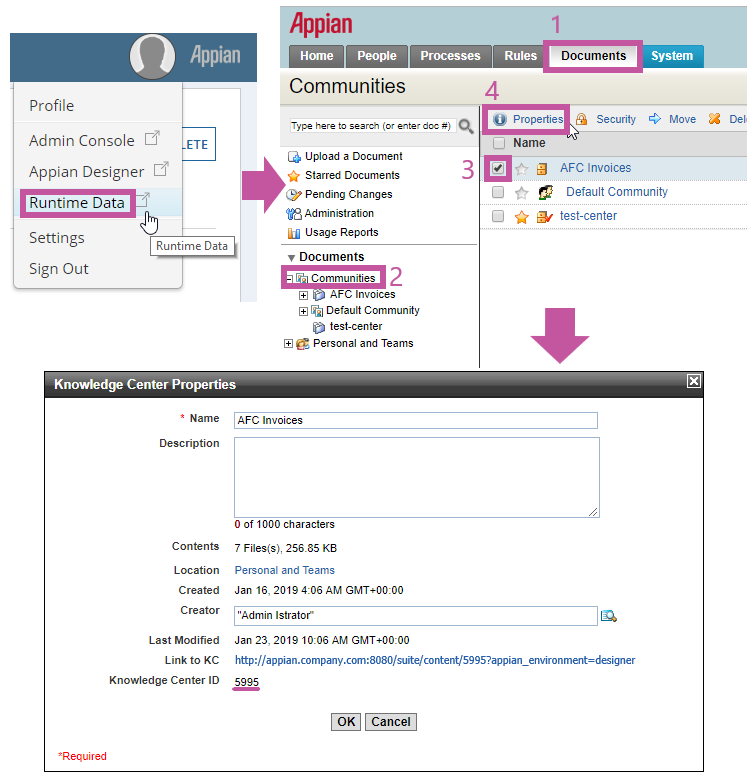
Repository contains the identifier of the knowledge center in Appian. For example, <Repository>5995</Repository>.
(Appian 12) (Appian 12) Note: To look up the ID of a knowledge center, click the Runtime Data in the workspace and select the desired knowledge center in the Documents section. At the top of the workspace, you will see the actions that can be performed on the selected knowledge center. Click Properties at the top of the workspace. A Knowledge Center Properties dialog box will open displaying the ID of the knowledge center:
(Appian 12) FolderPath contains the name of the folder to be created in Appian. For example, <FolderPath><Batch></FolderPath>.
(Appian 12) FileName contains the name of the document that will be created at the time of export. For example, <FileName><Batch>_<Identifier></FileName>.
(Appian 12) The name of the document may have an unchanging static part and a changing dynamic part. The dynamic part is defined by tags, which are replaced by the ABBYY FlexiCapture document property values at the time of export. Each tag must be enclosed in angle brackets. In the XML file:
- (Appian 12) ‘<’ stands for ‘<’;
- (Appian 12) ‘>’ stands for ‘>’.
(Appian 12) Possible tags for the dynamic part of the name:
- (Appian 12) Project for the name of the project in ABBYY FlexiCapture;
- (Appian 12) Batch for the name of the batch;
- (Appian 12) DocumentDefinition for the name of the Document Definition in ABBYY FlexiCapture;
- (Appian 12) SourceFile for the name of the source file;
- (Appian 12) Identifier for the document identifier in the batch;
- (Appian 12) BatchType for the name of the batch type;
- (Appian 12) Time for the current time in yyyy-MM-dd_HH-mm-ss format.
(Appian 12) These dynamically replaceable tags are case-sensitive and the register of the characters used in the tags above should be preserved.
(Appian 12) The following is an example of a document name with a static part:
<FileName>My_static_prefix_<DocumentDefinition>_<Identifier>and_postfix</FileName>
(Appian 12) The following is an example of a document name without a static part:
<FileName><Project>_<Identifier></FileName>
(Appian 11, Appian 12) NameConflictResolution is used to resolve name conflicts. Possible values:
- (Appian 11, Appian 12) NewVersion – A new version of the document will be created.
- (Appian 11, Appian 12) NewName – A new document with a new name will be created.
(Appian 11, Appian 12) For example,
<CreationPolicy>
<NameConflictResolution>NewVersion</NameConflictResolution>
</CreationPolicy>
(Appian 11, Appian 12) DmsMetadataTemplate contains the name of the record type in plural form which will be visible in Tempo. Each ABBYY FlexiCapture Document Definition must have its own record type in Appian. For example,
<DmsMetadataTemplate>
<Name>Account Payable Records</Name>
</DmsMetadataTemplate>
(Appian 11, Appian 12) FieldPairs contains a collection of field pairs.
(Appian 11, Appian 12) If your export settings are stored in an XML file, map the fields as follows:
<FieldPairs>
<FieldPair>
<AfcField>Invoice\InvoiceNumber</AfcField>
<DmsField>InvoiceNumber</DmsField>
</FieldPair>
</FieldPairs>
(Appian 11, Appian 12) where:
-
(Appian 11, Appian 12) AfcField is the full path to the FlexiCapture Document Definition field from which data are to be read at the time of export.
-
(Appian 11, Appian 12) DmsField is the Appian data type field where data will be written at the time of export.
(Appian 11, Appian 12) Only for export settings specified in an XML file. For export settings specified in the script, map the fields as follows:
Dictionary<string, string> pairs = new Dictionary<string, string>()
{
{ @"Invoice Layout\InvoiceNumber", "InvoiceNumber" },
...
};
connectorSettings.MappedFields.FieldPairs = new MappedFields(pairs).FieldPairs;
(Appian 11, Appian 12) where the value before the comma is the full path to a field in FlexiCapture and the value after the comma is the name of the respective field in the data type.
Dictionary<string, string> pairs = new Dictionary<string, string>()
{
...
{ @"Invoice Layout\LineItems\Description", @"LineItems\Description" },
...
};
connectorSettings.MappedFields.FieldPairs = new MappedFields(pairs).FieldPairs;
(Appian 11, Appian 12) where the second LineItems is the name of the field in the main data type that stores the array of objects of the auxiliary data type, and Description is the name of the mapped field in the auxiliary data type.