Import the package into Blue Prism
1
Extract the distribution package
Run the
ABBYY_FlexiCapture_Connector_for_BluePrism.exe file, select a destination folder, and click Extract.2
Start the import
Open Blue Prism - Robotic Process Automation Software and click File → Import.
3
Select the release file
Select the
.bprelease file in the following folder:4
Publish the processes
Click Next. A message asks
The incoming process has been published. Do you want to publish the process in this database after importing?Select Yes for each process to make it available on the Control tab, and then click Next.5
Import the additional VBOs
Repeat the preceding steps to import the following VBOs from
Blue Prism Limited\Blue Prism Automate\VBO:BPA Object - Utility - Environment.xmlBPA Object - Utility - File Management.xmlBPA Object - Utility - General.xml
6
Restart Blue Prism
Restart Blue Prism to apply the changes.
What the import creates
Processes and objects on the Studio tab
A FlexiCapture 12 Processes group appears in the list of processes and contains the sample processes. A FlexiCapture VBOs group appears in the list of objects and contains the FlexiCapture 12 – Multitask VBO. The additional VBOs go into the Default group under Objects.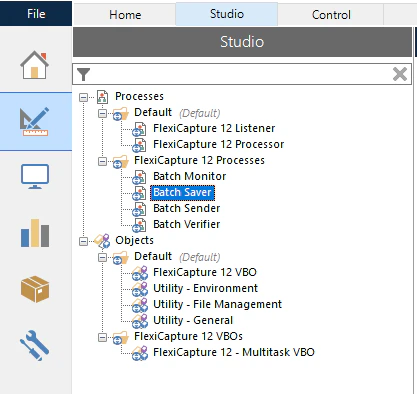
Queues on the Control tab
The FetcherQueue, MonitorQueue, and VerifierQueue queues appear in the Queue Management group. The processes require them.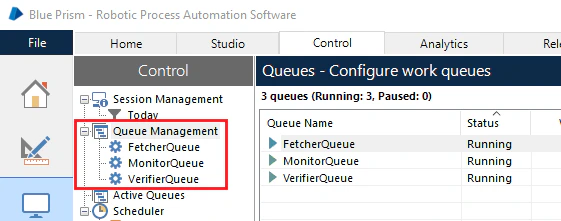
Variables on the System tab
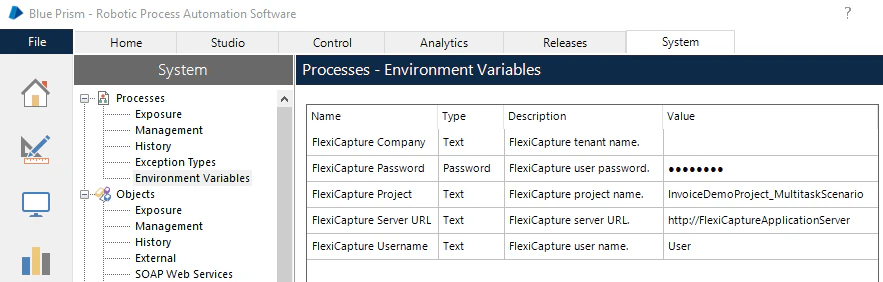
The FlexiCapture Password, FlexiCapture Project, FlexiCapture ServerURL, FlexiCapture Username, and FlexiCapture Company variables appear in the Environmental Variables section of the Processes node. They hold the settings the processes use to connect to ABBYY FlexiCapture.