The FC Multi-Task Package includes the following processes:

Batch Sender

This process takes files from a folder and uses the “Create Batch” VBO action to send them to FC 12 for processing. FC will create a single batch for each file it finds in that folder. Next, the ID of the newly created batch is added to the MonitorQueue queue for subsequent processing in the Batch Monitor process.

Batch Monitor

This is a constantly running process which handles items in the MonitorQueue queue. Using the “Get Batch Stage” VBO action, it gets the stage of a batch and performs the following:
  • If a batch is at the “Exceptions” stage (where they may be placed due to processing errors), an item in MonitorQueue queue will be marked as an exception. The text of the error message will be recorded in the “Exception Reason” section.
  • For a batch at the “Verification” stage, a new item will be added to the VerifierQueue queue and the processing of the item in the MonitorQueue queue will be postponed. The element will not be added to the VerifierQueue queue once again.
  • For a batch at the “Processed” stage, a new item will be added to the FetcherQueue queue, after which the item in the MonitorQueue queue will be marked as successfully processed.
  • For a batch at any other stage, the processing of the MonitorQueue queue will be postponed.
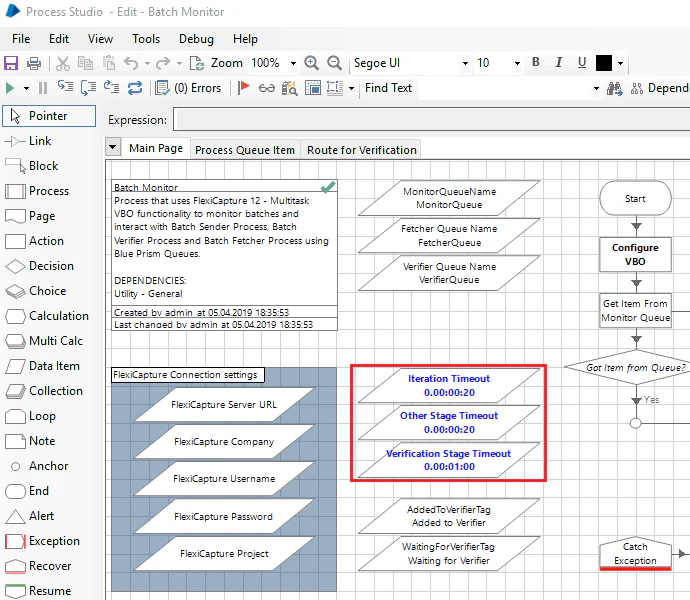
In the Batch Monitor process, there are data items for storing timeout values:
  • Iteration Timeout – the time after which the Batch Monitor process will reattempt to get the item from the MonitorQueue queue if the first attempt failed. The recommended value is 20-30 seconds.
  • Other Stage Timeout – the time for which batch status check will be delayed if the batch is currently at a stage other than “Processed”, “Verification” or “Exceptions”. The recommended value is the estimated time for the batch to go from the “Import” stage to the “Processed” or “Verification” stage.
  • Verification Stage Timeout – the time for which batch status check will be delayed if the batch is currently at the “Verification” stage. The recommended value is at least 2x the estimated time of verification by the operator.
You can change any of the default timeout values depending on the current FC loads.

Batch Verifier

This process handles items from the VerifierQueue queue, one item at a time. It gets verification URLs by the ID of the batch and opens them in a browser, where the respective documents can be verified by the verifier. Once verified, an item is marked as completed.

Batch Saver

This is a constantly running process which handles items from the FetcherQueue queue. It accepts batch processing results and saves the export files created for each document in a batch. Once the export files are saved, the process marks the item as successfully processed.