
Prerequisites
Install the ABBYY FlexiCapture 12 Project Setup Station before you set up the connector. It is required for both ABBYY FlexiCapture Distributed Edition and ABBYY FlexiCapture Cloud. You also need access rights to M-Files.How export settings are organized
ABBYY FlexiCapture uses projects to process documents. ABBYY FlexiCapture identifies the type of each document and applies the Document Definition prepared for that type. Every Document Definition has one or more export profiles, which determine how document images and data are exported. Setting up export to M-Files means creating a new script export profile in your project.Open or create a project
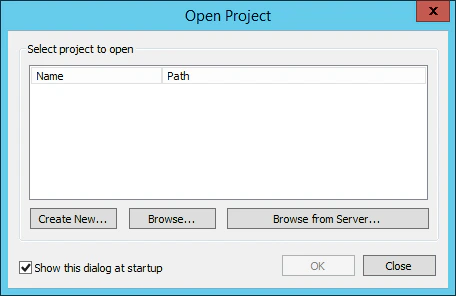
If you already have a project that needs export to M-Files, open it. Otherwise, create one. Launch the Project Setup Station, and in the Open Project dialog box click one of the following:- Create New to create a new project.
- Browse to open an existing project stored on your local drive.
- Browse from Server to open a project that you previously uploaded to the ABBYY FlexiCapture Application Server.
Start from the sample project instead
The distribution package includes a sample ABBYY FlexiCapture project with a preconfigured profile for exporting data to M-Files. To open it for editing, unzip theInvoiceDemoProject.zip archive in Samples\FlexiCapture Project and open InvoiceDemoProject.fcproj on the Project Setup Station.
For more information, see Set up the InvoiceDemoProject sample project.
Upload the project to the Application Server
1
Start the upload
Click File → Upload Project to Server.
2
Specify the server and credentials
In the Upload Project to Application Server dialog box, specify the address of the server, the protocol to be used, and your credentials.For ABBYY FlexiCapture Cloud, complete the URL field with the ABBYY FlexiCapture Cloud instance that your company is registered in: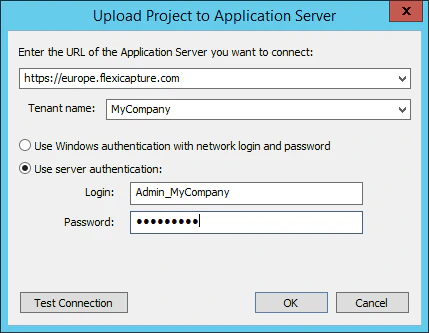
https://europe.flexicapture.comhttps://australia.flexicapture.comhttps://usa.flexicapture.com
3
Test the connection and upload
Click Test Connection to check that you have entered the correct data, and then click OK to upload the project.
4
Open the uploaded project
When the 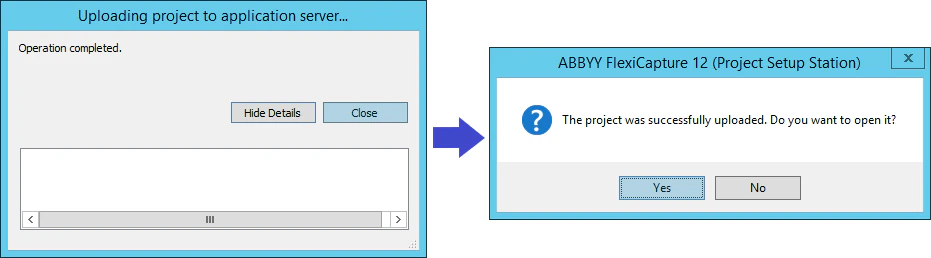
Operation completed message appears, click Close. In the next dialog box, click Yes to open the uploaded project from the server.