The Abbyy.UiPath.FlexiCapture.MultiTaskActivities.nupkg activities package offers all the functionality you need to worki with FC 12. It includes the following activities for working with ABBYY FlexiCapture:
FlexiCapture Project Scope
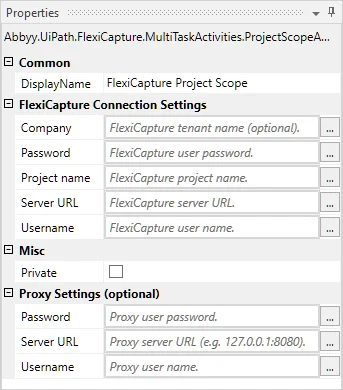
This activity is used for initializing the other activities in the package through the FC 12 connection settings. These other activities are placed in the child activity area to give them access to the FC connection settings.
The following is a list of activity parameters that are inherited by child activities:
| Category | Display Name | Type | Description |
|---|
| FlexiCapture Connection Settings | Server URL | Uri | Server address (without the tenant) |
| FlexiCapture Connection Settings | Company | String | Server tenant name (optional) |
| FlexiCapture Connection Settings | Username | String | User name |
| FlexiCapture Connection Settings | Password | SecureString | User password |
| FlexiCapture Connection Settings | Project name | String | Project name |
| Proxy Settings (optional) | Server URL | Uri | Proxy server address |
| Proxy Settings (optional) | Username | String | User name |
| Proxy Settings (optional) | Password | SecureString | User password |
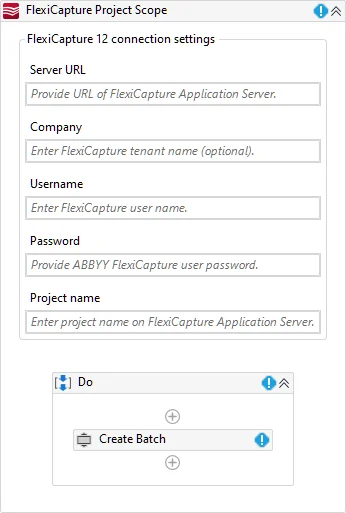
The FlexiCapture Project Scope designer allows you to manage connection settings and child activities:
If you are using a proxy:
- Create the following variables:
- A variable of type Uri named ProxyAddress with the following value:
New UriBuilder (“http://proxyserver:8080”).Uri. In place of “http://proxyserver:8080”, specify the address and port of the proxy server.
- A variable of type NetworkCredential named ProxyCredential with the following value:
New System.Net.NetworkCredential(“proxyuser”, “proxypass”). In place of “proxyuser” and “proxypass”, specify the proxy credentials separated by a comma. Create this variable if your proxy uses Basic authentication.
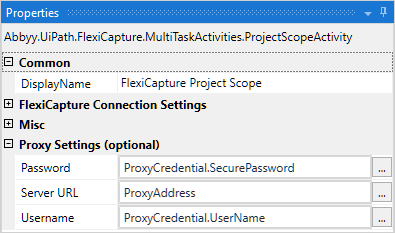
- Use the variables created in step 1 to pass the proxy connection settings to the FlexiCapture Project Scope activity (click FlexiCapture Project Scope → Proxy Settings (optional)). Depending on the authentication type required by the proxy, do the following:
- If a transparent proxy is used, in the Server URL field, pass the proxy server address and port as the value of the ProxyAddress variable and leave the Username and Password fields empty.
- If the proxy uses NTLM authentication, in the Server URL field, pass the proxy server address and port as the value of the ProxyAddress variable and leave the Username and Password fields empty. The credentials under which the UiPath process is running will be used.
- If the proxy uses Basic authentication, in the Server URL field, pass the proxy server address and port as the value of the ProxyAddress variable. In the Username and Password fields, pass the proxy credentials as the values of the corresponding properties of the ProxyCredential variable.
These proxy server settings will be inherited by all the child activities of this Project Scope.
Create Batch
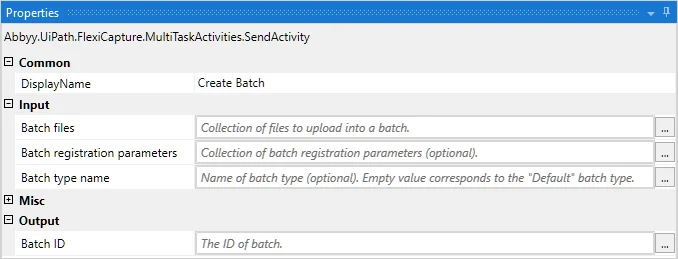
This activity is used to send files to FC 12 for processing. ABBYY FlexiCapture creates a batch with a unique identifier for all documents sent by this activity. This identifier is then returned as the Batch ID output argument.
Activity parameters:
| Category | Display Name | Type | Description |
|---|
| Input | Batch type name | String | Name of the batch type for the batch that is being created (optional) |
| Input | Batch registration parameters | IEnumerable<KeyValuePair< String,String >> | A collection of registration parameters for the batch that is being created, specified in the following format: Registration parameter name — Registration parameter value (optional) |
| Input | Batch files | IEnumerable<KeyValuePair<String,Byte[]>> | A collection of input files for the batch that is being created, specified in the following format: File name — Byte content |
| Output | Batch ID | Int32 | ID of the created batch |
Get Batch Stage
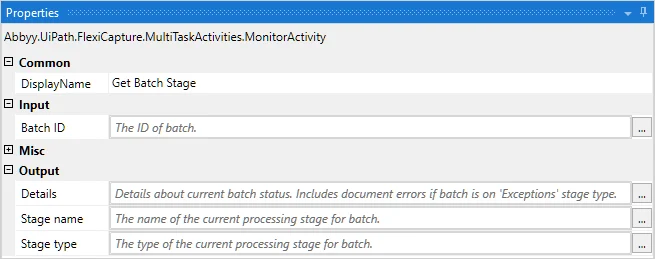
This activity is used to get information about the current batch stage. Values describing the batch state can be used, for example, to group batches for processing by their current stage.
Activity parameters:
| Category | Display Name | Type | Description |
|---|
| Input | Batch ID | Int32 | Batch ID |
| Output | Stage type | Enum | Processing stage type |
| Output | Stage name | String | Processing stage name |
| Output | Details | String | Additional information about the state of the batch |
Get Batch Verification URLs
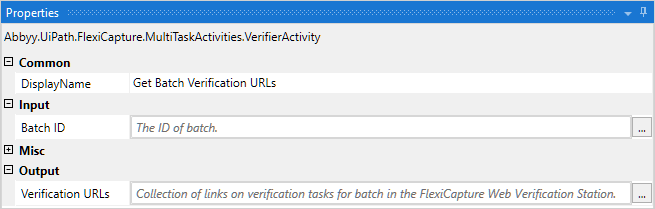
This activity is used to get a set of links to the FC Web Verification Station for batch verification (uses the batch ID).
Activity parameters:
| Category | Display Name | Type | Description |
|---|
| Input | Batch ID | Int32 | Batch ID |
| Output | Verification URLs | IEnumberable<Uri> | A set of batch verification URLs |
Fetch Batch Result
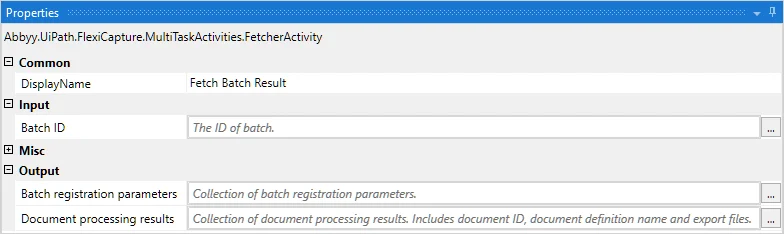
This activity is used to get the batch processing results.
Activity parameters:
| Category | Name | Display Name | Type | Description |
|---|
| Input | BatchId | Batch ID | Int32 | Batch ID |
| Output | BatchRegistrationParameters | Batch registration parameters | IEnumerable<KeyValuePair<String,String>> | Batch registration parameter set |
| Output | DocumentProcessingResults | Document processing results | IEnumerable<DocumentProcessingResult> | Batch document processing result set |
DocumentProcessingResult class properties:
| Name | Type | Description |
|---|
| DocumentId | Int32 | Document ID |
| DocumentDefinition | String | Name of the matched document definition |
| Files | IEnumerable<KeyValuePair<String,Byte[]>> | Export files |