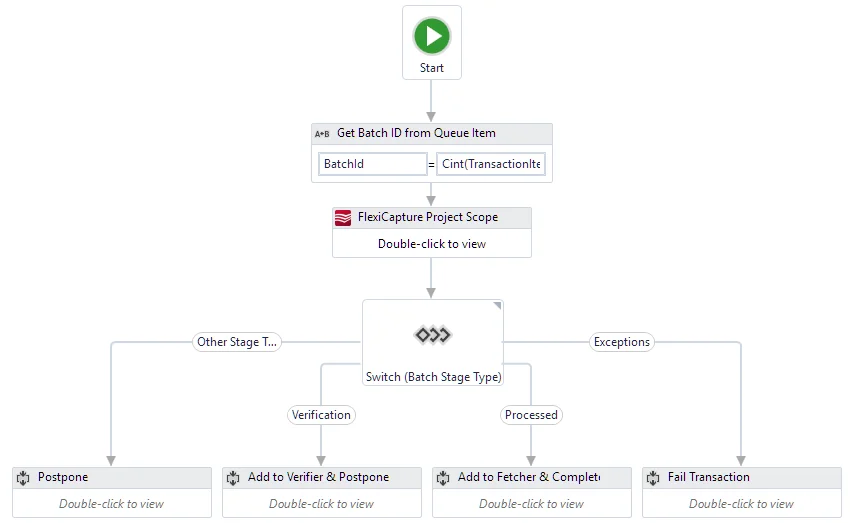
The ABBYY FlexiCapture Multi-Task Package includes five processes:
Batch Sender
This process takes files from a folder and uses the Create Batch activity to send them to ABBYY FlexiCapture 12 for processing. ABBYY FlexiCapture creates a single batch for each file it finds in that folder.
The process then adds the ID of the new batch to the Monitor Queue, for the Batch Monitor process to pick up.
Batch Monitor
This process runs constantly and handles items in the Monitor Queue. It uses the Get Batch Stage activity to get the stage of a batch, and then acts on it.
Launch this process from UiPath Orchestrator.
Batch Verifier
This process handles items from the Verifier Queue, one at a time. It gets the verification URLs by batch ID and opens them in a browser, where the verifier can verify the documents. After verification, it marks the item as completed.
Batch Fetcher
This process runs constantly and handles items from the Fetcher Queue. It accepts batch processing results and saves the export files created for each document in a batch. After saving the export files, it marks the item as successfully processed.
Batch Processor – single process
This process performs the full document processing procedure in ABBYY FlexiCapture. It creates batches, checks their status, gets verification URLs, and downloads the processing results. It combines the Batch Sender, Batch Monitor, Batch Verifier, and Batch Fetcher processes.
This process needs no UiPath Orchestrator assets or queues, so you can launch it from UiPath Studio without connecting a Robot to Orchestrator.