
- the properties which affect the process of text recognition in the block. They are ImageProcessingParams, AnalysisParams and RecognizerParams. These properties let you set special parameters of processing for a single block.
- the properties which can be either set after analysis and before recognition, or filled in by the program during recognition. These include BlockRole and BusinessCardFieldType, used to specify the role of the block in the different types of documents. The TextOrientation property also belongs to this group.
- the recognition results. This group contains only the Text property, which represents the recognized text of the block.
Properties
Name | Type | Description |
|---|---|---|
Processing settings | ||
Provides access to the analysis parameters of the text block. | ||
Provides access to the image preprocessing parameters of the text block. | ||
Provides access to the recognition parameters of the text block. | ||
The role and orientation of the text | ||
Specifies the role of the text block in the logical structure of a document. By default, it is BR_Unknown. | ||
Provides access to the role of the text block as a part of a business card. When the IFRPage::SynthesizeBusinessCard method is called, FineReader Engine presumes the block with the specified role in a business card to be a field of corresponding type. If the block cannot be considered as the field of this type, the text of the block will not appear in the text of the business card. By default, it is BCFT_Unknown. | ||
Specifies the text orientation in the block. If you set it before recognition it will affect the way the text in the block is interpreted (e.g., in lines or in columns); otherwise, it will contain the detected orientation after recognition. | ||
Results of recognition | ||
Contains the recognized text of the text block. | ||
Methods
Related objects
Windows
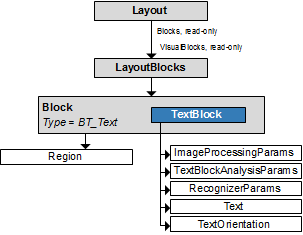
Linux and macOS
 Object Diagram
Output parameter
This object is the output parameter of the GetAsTextBlock method of the Block object.Samples
C# code
C# code
- Linux: CustomLanguage
- Windows: CustomLanguage, RecognizedTextProcessing; and demo tools: Engine Predefined Processing Profiles