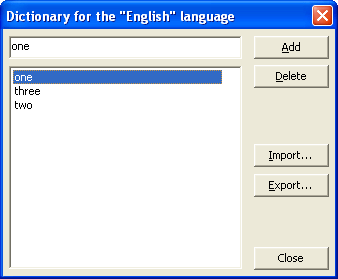
The Dictionary dialog box in the ABBYY FineReader Engine API — Windows dialog for editing a user dictionary, including importing words from ANSI- and Unicode-encoded text files.
This topic applies to FRE for Windows.
This dialog box appears when editing user dictionary via the Edit method of the Dictionary object in Windows.
Option
Option Description
The top dialog box field
Enter the word you want to add to the dictionary here.
Word list
Displays all user dictionary words. Select the word you want to delete.
Add (button)
Adds the word you typed in the top line to the dictionary.
Delete (button)
Deletes the selected word from the dictionary.
Import (button)
Imports an already existing dictionary (for example, any text file in Windows ANSI- and Unicode-encoding (the only requirement is that words must be separated by spaces or other non-alphabetic characters).