
Batch Sender
1
Open the process variables
Open the process in UiPath Studio, navigate to the Acquire connection settings from Orchestrator area, and expand the Variables pane.
2
Set the asset names
Enter the new asset names in the Default column for each of the four variables.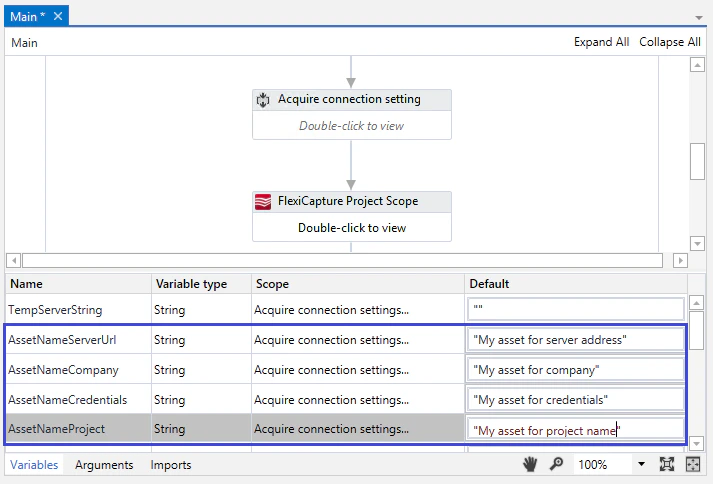
Batch Monitor
1
Open the process variables
Open the process in UiPath Studio, navigate to the State Machine area, and select Initialization → Acquire connection settings from Orchestrator. Then expand the Variables tab.
2
Set the asset names
Enter the new asset names in the Default column for each of the four variables.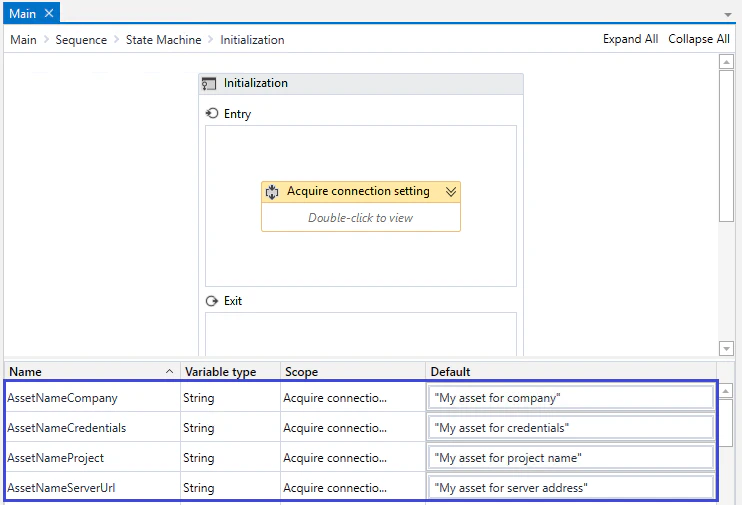
Batch Verifier
1
Open the process variables
Open the process in UiPath Studio, navigate to the Acquire connection settings from Orchestrator area, and expand the Variables tab.
2
Set the asset names
Enter the new asset names in the Default column for each of the four variables.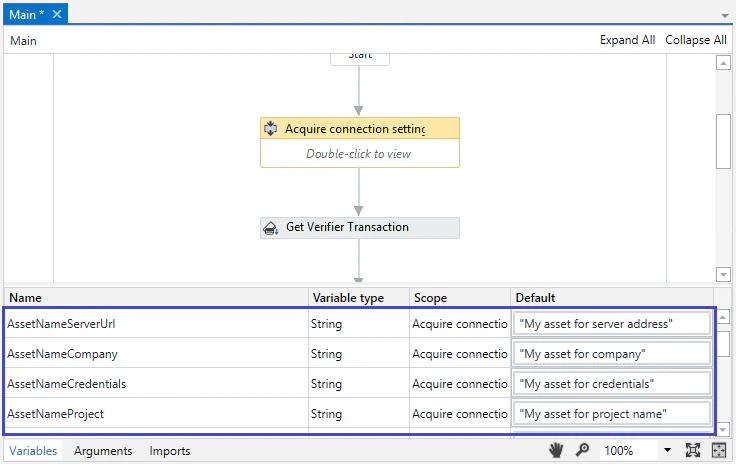
Batch Fetcher
1
Open the process variables
Open the process in UiPath Studio, navigate to the Acquire connection settings from Orchestrator area, and expand the Variables tab.
2
Set the asset names
Enter the new asset names in the Default column for each of the four variables.